Designing a Segmented Active Directory Lab Behind a pfSense Firewall
How I designed the network for my Hybrid Identity Detection Lab, why a firewall has to sit between the attacker and the domain, and the design mistake I caught before building anything.
Overview
This is the first post in my Hybrid Identity Detection Lab project. The goal is to build an Active Directory domain, harden it, attack it, detect the attacks, investigate the compromised domain controller, and then extend the lab into Microsoft Entra ID and Microsoft Sentinel.
Before installing anything I designed the network. This post covers the design and the reasoning behind it, including a mistake in my first version.
The full design document is in the project repository: hybrid-identity-detection-lab on GitHub.
The problem
The tutorial that started this project has the domain controller do the routing and NAT. That works for a demo, but real networks separate those jobs. I also had a specific requirement: a port scan from the attacker should be visible to a firewall, so I can write and test network-level detections later.
The network had to meet four requirements:
- Behave like a real Active Directory environment.
- Force attacker traffic through a firewall.
- Stay isolated, with internet access for updates only.
- Be easy to reset with snapshots.
Environment
- Host: Arch Linux laptop, 16 GB RAM, VirtualBox 7.2
- Firewall: pfSense CE (VM
fw01) - Domain controller: Windows Server 2022 evaluation (VM
DC01) - Client: Windows 11 Pro (VM
win11) - Attacker: the Arch host itself
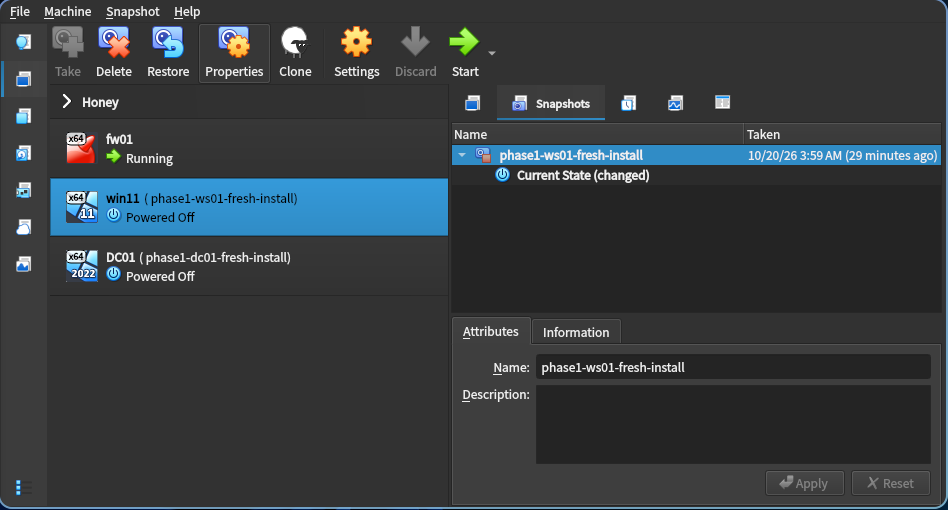 The lab VMs in VirtualBox, each with a fresh-install snapshot
My first design, and why it was wrong
My first version put everything on one subnet, 10.0.10.0/24, with pfSense as the default gateway. It looked simple, and the firewall still sat in the path to the internet.
Then I rechecked it against the project goals and found the flaw.
A router or firewall only sees traffic that crosses a subnet boundary. Traffic between two hosts on the same subnet is switched at Layer 2 and never reaches the gateway.
If the attacker and the domain controller share a subnet, a port scan against the DC goes straight across the virtual switch. pfSense never sees it, so it can neither log nor block it. My simplification would have made one of the lab’s own objectives impossible.
The corrected design: two zones
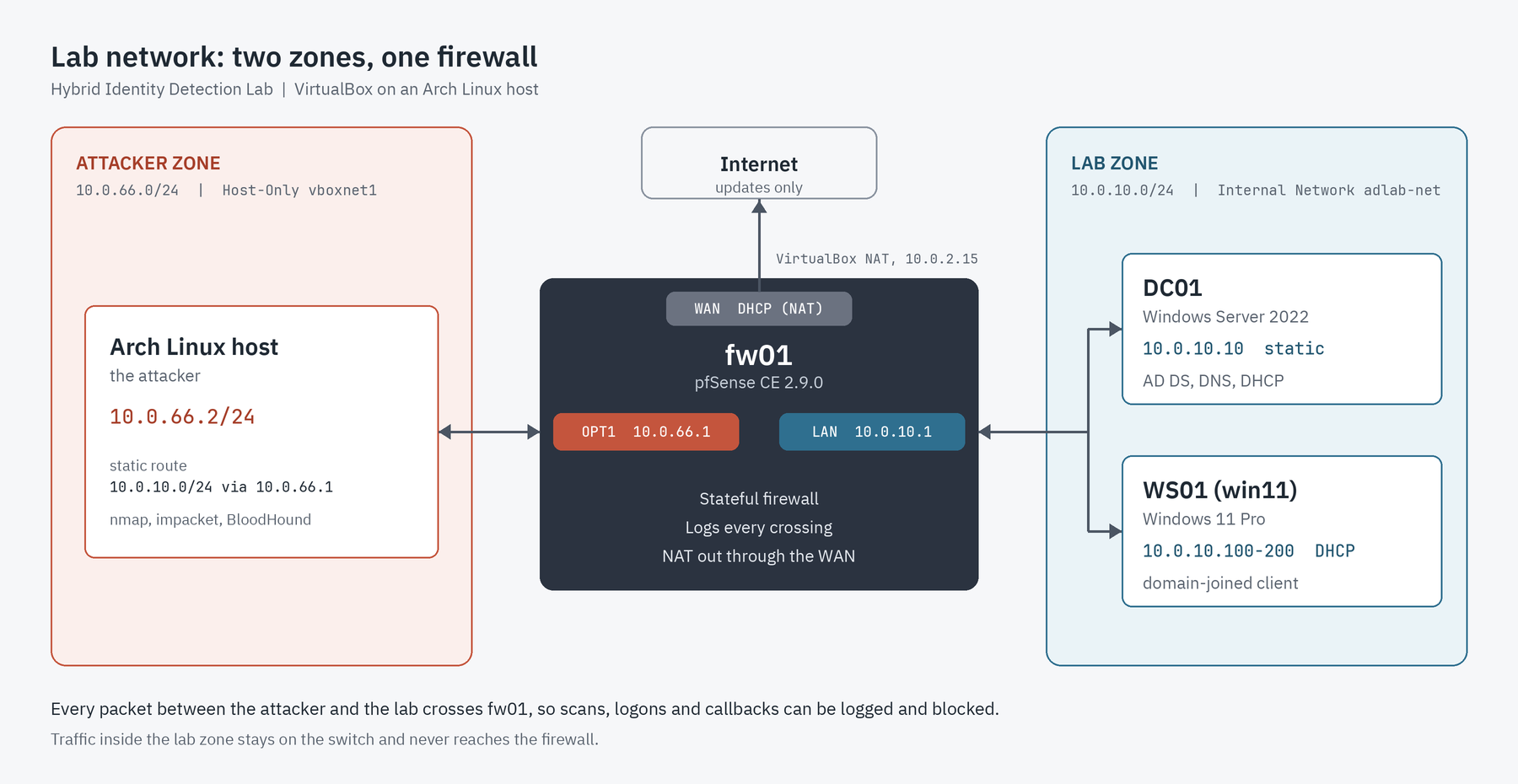
I moved the attacker to its own subnet so that all attack traffic has to pass through the firewall.
| Zone | VirtualBox mode | Subnet | Members |
|---|---|---|---|
| Attacker | Host-Only (vboxnet1) | 10.0.66.0/24 | Arch host (10.0.66.2) |
| Lab | Internal Network (adlab-net) | 10.0.10.0/24 | dc01, ws01 |
| Internet | NAT | from VirtualBox | pfSense WAN only |
pfSense has three interfaces, one in each zone:
| Interface | Address | Role |
|---|---|---|
| WAN | DHCP (NAT) | Internet for updates |
| LAN | 10.0.10.1 | Gateway for the lab zone |
| OPT1 | 10.0.66.1 | Gateway for the attacker zone and the sensor point |
Two zones with pfSense between them
Why each decision
Why Host-Only for the attacker
Host-Only is the only VirtualBox mode that puts the physical host on a virtual network with VMs. Since my Arch machine is the attacker, it has to sit on that wire.
Why Internal Network for the lab
An Internal Network is sealed from the host and the internet. The only way out of the domain controller and the client is through pfSense, so the firewall sees everything they send.
Why a static route on the host
The host is directly connected to 10.0.66.0/24 but knows nothing about 10.0.10.0/24. Without a route, traffic for the lab goes to my real router and leaves my machine. One route fixes that:
1
sudo ip route add 10.0.10.0/24 via 10.0.66.1
The replies come back by themselves. The lab machines use pfSense as their default gateway, and pfSense knows the attacker subnet is on OPT1.
Why DNS and DHCP live on the domain controller
Active Directory finds domain controllers through DNS records, so the client must use dc01 as its DNS server. DHCP on the DC hands out the gateway and the DNS server together, so DHCP on pfSense is turned off to avoid two servers answering.
The trade-off I chose
Servers and clients share one subnet. In production I would split them, but it adds routing and DHCP relay work without teaching more about identity attacks. The design extends cleanly later: add an interface and move the client.
Safety controls
- No bridged adapters, so nothing reaches the real network
- The Arch host must not forward lab traffic to my real network. IP forwarding is on, because Docker is installed. I checked the firewall: the IPv4
FORWARDpolicy isDROPand Docker’s chains only accept traffic from Docker’s own bridges, so nothing forwards traffic from the lab interface. IPv6 is blocked only by the kernel settingnet.ipv6.conf.all.forwarding = 0, while its firewall policy isACCEPT, which is a weaker control that I have noted as an open item - My existing VirtualBox networks are untouched: I created a new Host-Only adapter and a new internal network name
- Windows Server evaluation media only, and Windows 11 installed without a product key
- A snapshot before every major change and before every attack
Outcome
- A written design with addressing, firewall policy and a verification checklist
- A network that makes every attack path pass through a logging firewall
- A host-side adapter,
vboxnet1, configured as10.0.66.2/24
What I would do differently
I should have tested the design against the objectives before writing it up. The single-subnet version looked finished and was wrong. Checking the design against what I needed to detect is now part of how I review a network.
Next
Installing pfSense and assigning its three interfaces. That is covered in the next post.