What a Domain Controller Logs, and What It Doesn't
Wrong passwords, a disabled account and a drifting clock, and what the Windows Security log on the domain controller and the workstation did and did not record.
Overview
This is the seventh post in my Hybrid Identity Detection Lab project. In the last post I created, disabled and restored a test account by hand. While doing that I kept looking in the Security log for the failed logins, and the log kept surprising me.
This post is about what a fresh domain controller records and what it silently leaves out, because my Phase 2 detections can only find what is logged. It also covers a clock problem that turned out to matter for Kerberos.
All commands were run in an elevated PowerShell, on DC01 unless a heading says WS01.
A disabled account, and an event that isn’t there
In the last post I disabled tuser and tried to sign in on WS01 with the correct password. Windows said the account had been disabled. Then I read the log on DC01:
1
Get-WinEvent -LogName Security -FilterXPath "*[System[(EventID=4725 or EventID=4722 or EventID=4768 or EventID=4771)]]" -MaxEvents 8 | Select TimeCreated, Id
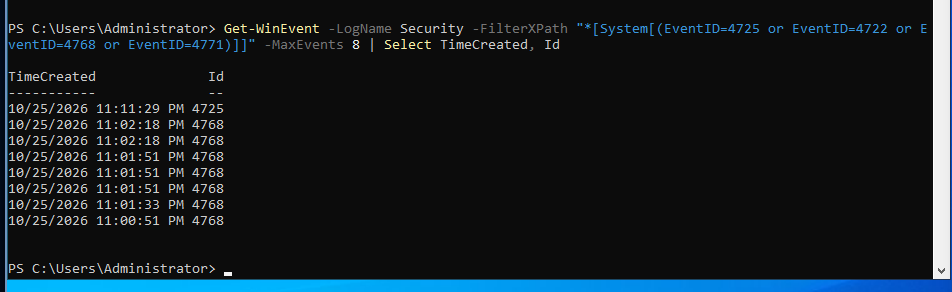 Event 4725, “an account was disabled”, at 11:11:29 PM, above the earlier ticket requests
Event 4725 records the disabling. The 4768 events below it are from 11:00 to 11:02 PM, before I disabled the account.
What surprised me: the newest event is the 4725. I tried to sign in after disabling the account, and the list has no failure event from that attempt. I did not check why at the time. The rest of this post is the result of checking: the domain controller records Kerberos successes but not failures. A detection that depends on failed logins would see nothing until the audit policy is changed.
No account lockout
1
Get-ADDefaultDomainPasswordPolicy | Select MinPasswordLength, ComplexityEnabled, LockoutThreshold, LockoutDuration
The policy shows a minimum password length of 7, complexity enabled, and LockoutThreshold 0. A threshold of zero means an account is never locked, however many wrong passwords are typed. The lockout duration shows 30 minutes, but it only matters when a threshold is set. This is the first real hardening finding in the lab: anyone who can reach the domain controller can guess passwords without limit. I will set a lockout threshold in the Group Policy step.
Wrong passwords on the sign-in screen
With a threshold of 0, I expected nothing to stop me. I typed a wrong password for Lab\tuser five times on WS01:
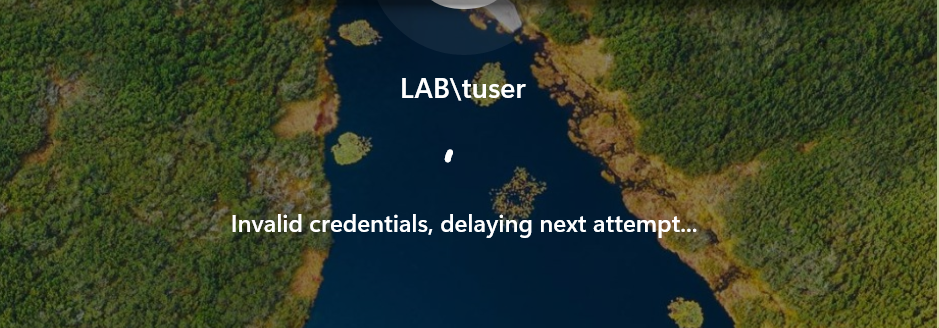 “Invalid credentials, delaying next attempt…” after repeated wrong passwords
The sign-in screen slowed me down, but this is not an account lockout. The delay comes from the workstation, not the domain controller, and it only stops someone typing at that keyboard. A network attacker never sees it, so the domain still needs a lockout threshold. Then I looked for the failures on the domain controller:
1
2
Get-WinEvent -LogName Security -FilterXPath "*[System[(EventID=4771 or EventID=4625)]]" -MaxEvents 8 | Select TimeCreated, Id
auditpol /get /subcategory:"Kerberos Authentication Service"
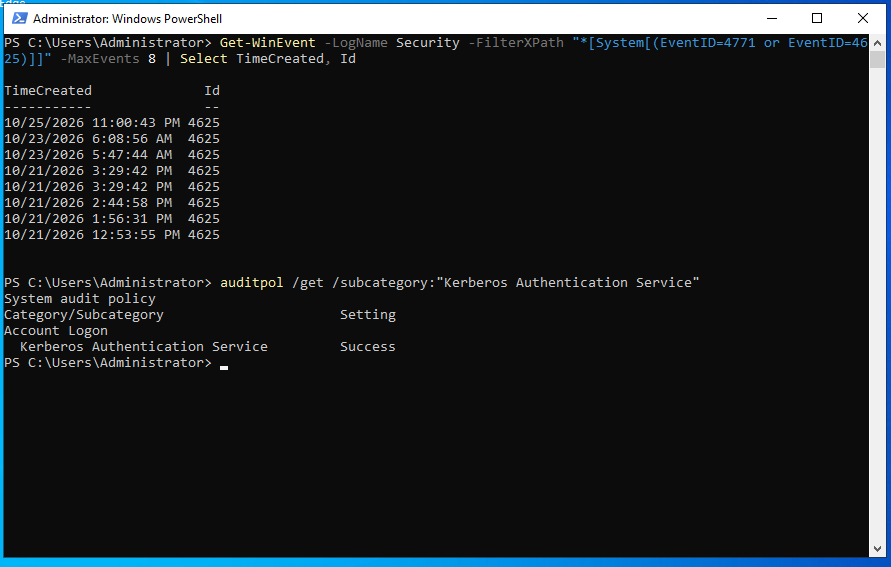 Only event 4625 appears, nothing newer than 11:00 PM, and the Kerberos Authentication Service audit setting is Success only
- There is no event 4771 at all. 4771 is the Kerberos pre-authentication failure, the event a wrong password produces on the domain controller.
- The newest 4625 is from 11:00:43 PM, which is before I disabled the account at 11:11 PM and long before the wrong-password test. So none of my five failed attempts left an event on the DC.
- The audit setting explains it: Kerberos Authentication Service is set to Success only. Failures are not recorded, so no 4771 can exist.
I then read the workstation’s own log and the older 4625 events on the domain controller. The two machines tell different stories.
On WS01, the failed attempts are there. Six 4625 events from 11:33:16 PM to 11:33:47 PM, all with:
- Account Name
tuser, Account DomainLAB - Logon Type
2(interactive, at the keyboard) - Status
0xC000006Dand Sub Status0xC000006A, with the reason “Unknown user name or bad password” - Subject
WS01$, source address127.0.0.1, logon processUser32
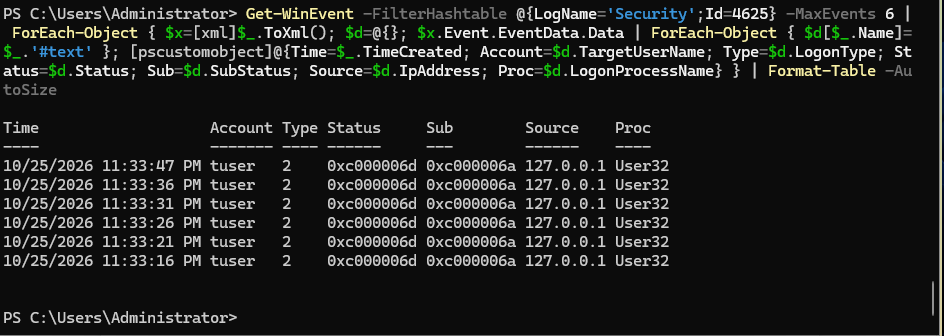 The workstation’s own log: six failed interactive logons for tuser, each with the wrong-password sub status
Sub Status 0xC000006A is the wrong-password code. 0xC0000072 would be a disabled account. So the workstation recorded my wrong passwords, with the account name, while the domain controller recorded nothing. A defender who collects logs only from the domain controller would miss someone guessing passwords at a keyboard. The workstations need to send their logs too, which is what the agents in Phase 2 are for.
On DC01, the 4625 list also holds two kinds of older entries:
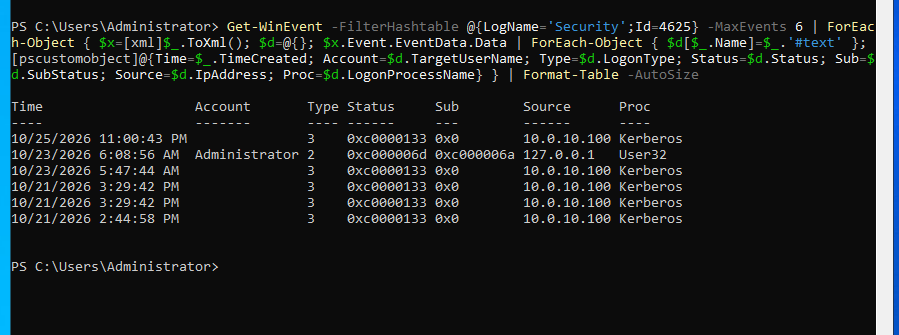
DC01’s 4625 events: one wrong password at the console, and five network logons from WS01’s address with status 0xc0000133
- At 6:08:56 AM on 23 October, an interactive logon (type 2) failed on DC01 for
LAB\Administrator, with the same sub status0xC000006A. That is a wrong password typed at the DC01 console. It has the same shape as the WS01 events, because both machines audit logon failures on themselves by default. Only the Kerberos failures on the domain controller are not recorded. - Five 4625 events with no account name, logon type
3(network), logon processKerberos, source10.0.10.100(WS01) and status0xC0000133: three on 21 October, one on 23 October and one on 25 October. That status means the two clocks were too far apart for Kerberos, which tolerates five minutes (Microsoft documents the mapping). So WS01 and DC01 disagreed again on 25 October, after I had fixed the clock on the 23rd. - The three from 21 October are older than the domain join, which I can’t explain. DC01’s clock was unreliable then, so the timestamps may be wrong.
The clock
When setting up a domain controller, the correct time is crucial. Kerberos rejects a login when two clocks differ by more than five minutes, and every domain member takes its time from the DC.
DC01 showed the wrong date, time and time zone, and w32tm /resync reported “time change too big” on both machines. I pointed DC01 at Cloudflare and pool.ntp.org:
1
w32tm /config /manualpeerlist:"time.cloudflare.com,0x8 pool.ntp.org,0x8" /syncfromflags:manual /reliable:yes /update
A restart fixed the clock. I don’t know whether the setting or the restart did it, or why it drifted. Afterwards w32tm /query /status showed the Cloudflare source, and WS01’s source was DC01.lab.internal, so time flows from the internet to DC01 to WS01.
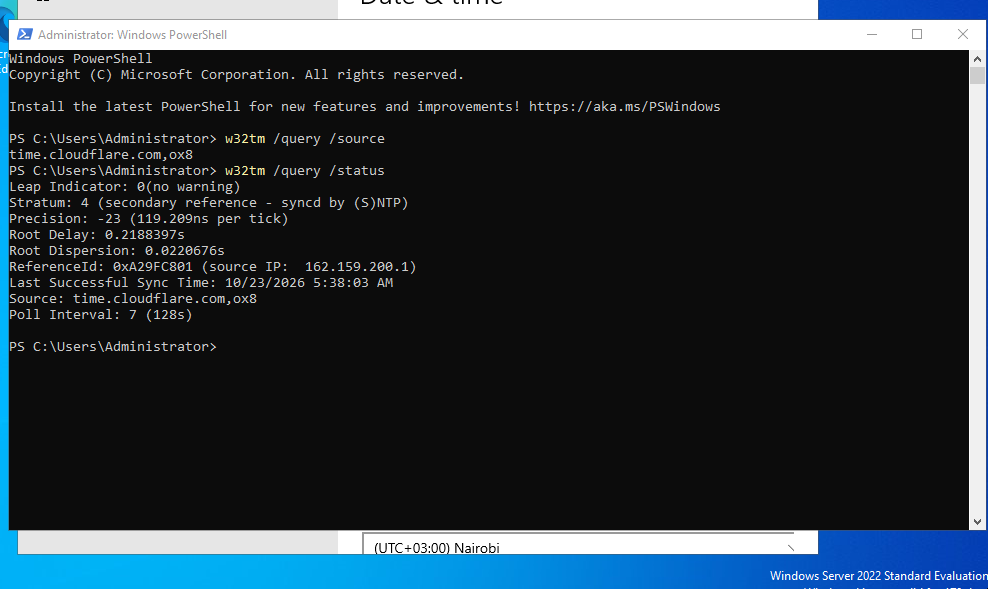 Source time.cloudflare.com, stratum 4, last sync at 5:38 AM, polling every 128 seconds
The Settings app greyed out the time controls with “managed by your organization”. Only the two default Group Policy objects apply to DC01, so I think that is normal Windows behaviour on a domain controller, though I have not confirmed it.
I also installed the VirtualBox Guest Additions on DC01 to paste long commands (on Arch the ISO is the virtualbox-guest-iso package). The clipboard is bidirectional, which is a path between my machine and the lab. I accept that on DC01 and will turn it off on any machine that handles malware.
Outcome
- A fresh domain controller records Kerberos successes and not failures. The audit setting says
Successonly, and there is no event 4771 anywhere in the log. - The workstation records its own failed interactive logons, with the account name and the wrong-password code. The domain controller records nothing for them. Logs from the workstations are not optional.
- The domain has no account lockout, because the threshold is 0. The delay on the sign-in screen is the workstation’s, and it does nothing against a network attack.
- WS01 and DC01 disagreed about the time again, and Kerberos refused the login.
Still open across the series
- DC01’s network profile is
Publicafter boot (post 4). It has to be fixed before the Windows Firewall policy. - The
dcdiagDFSREvent warning (post 4): the event log is still unread. - On the Arch host, IPv6 forwarding is blocked only by one kernel setting (post 1).
- The host route to the lab is not persistent, and I have not checked whether the DHCP blocks in the firewall log stopped (post 3).
Domain Usersis missing from the login token (post 6).- Why the clock drifted, and the failed logons dated before the join.
- Group Policy: record failed logons in the audit policy, and set an account lockout threshold.
What I would do differently
I would have checked the audit policy at the start, before trusting the log to tell me what happened. The absence of an event is only evidence if the event would have been recorded.
Next
The script that creates the five OUs and 150 users, then the Group Policy that fixes what this post found: the audit policy, the lockout threshold, and the rest of the hardening list.