Attacking Web Applications with Ffuf — HTB Academy Walkthrough
A walkthrough of the Attacking Web Applications with Ffuf module on HTB Academy, covering directory and page fuzzing, subdomain and VHost enumeration, parameter discovery, and value fuzzing to capture flags.
Overview
The Attacking Web Applications with Ffuf module on HTB Academy introduces one of the most effective tools in a penetration tester’s reconnaissance arsenal. ffuf — Fuzz Faster U Fool — is a fast, flexible web fuzzer built for discovering hidden content and enumerating attack surfaces across HTTP applications.
The module covers:
- Directory and page fuzzing with wordlists
- Recursive scanning with extension filtering
- Subdomain enumeration against real targets
- VHost fuzzing on internally routed domains
- GET and POST parameter discovery
- Value fuzzing to extract flags via
curl
This is a full walkthrough of how I worked through the module — the commands, the reasoning, and the lessons that carry into real engagements.
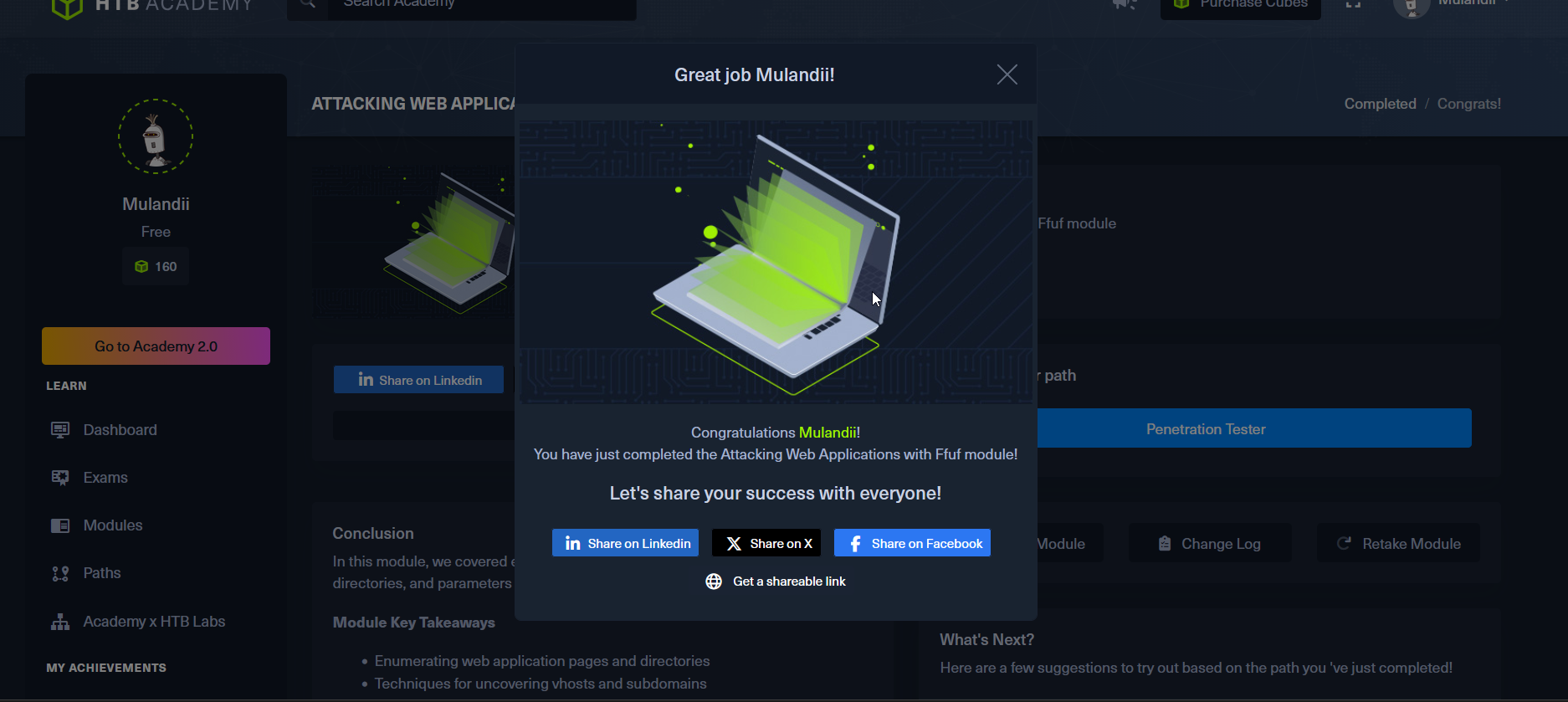
Module completion: https://academy.hackthebox.com/achievement/2164494/54/
HTB Academy — Attacking Web Applications with Ffuf completed
Part 1: Directory and Page Fuzzing
Finding Hidden Directories
💡 Question: In addition to the directory we found above, there is another directory that can be found. What is it? Answer:
forum
The first task was straightforward directory brute-forcing. Using ffuf with the directory-list-2.3-small.txt wordlist against the target, the -w flag specifies the wordlist and -u defines the target URL, with FUZZ as the injection point:
1
2
ffuf -w /opt/useful/seclists/Discovery/Web-Content/directory-list-2.3-small.txt:FUZZ \
     -u http://154.57.164.67:30966/FUZZ
1
2
forum        [Status: 301, Size: 323, Words: 20, Lines: 10, Duration: 7ms]
blog         [Status: 301, Size: 322, Words: 20, Lines: 10, Duration: 1040ms]
The hint confirmed the answer should be all lowercase. Both forum and blog returned 301 redirects — valid, navigable directories.
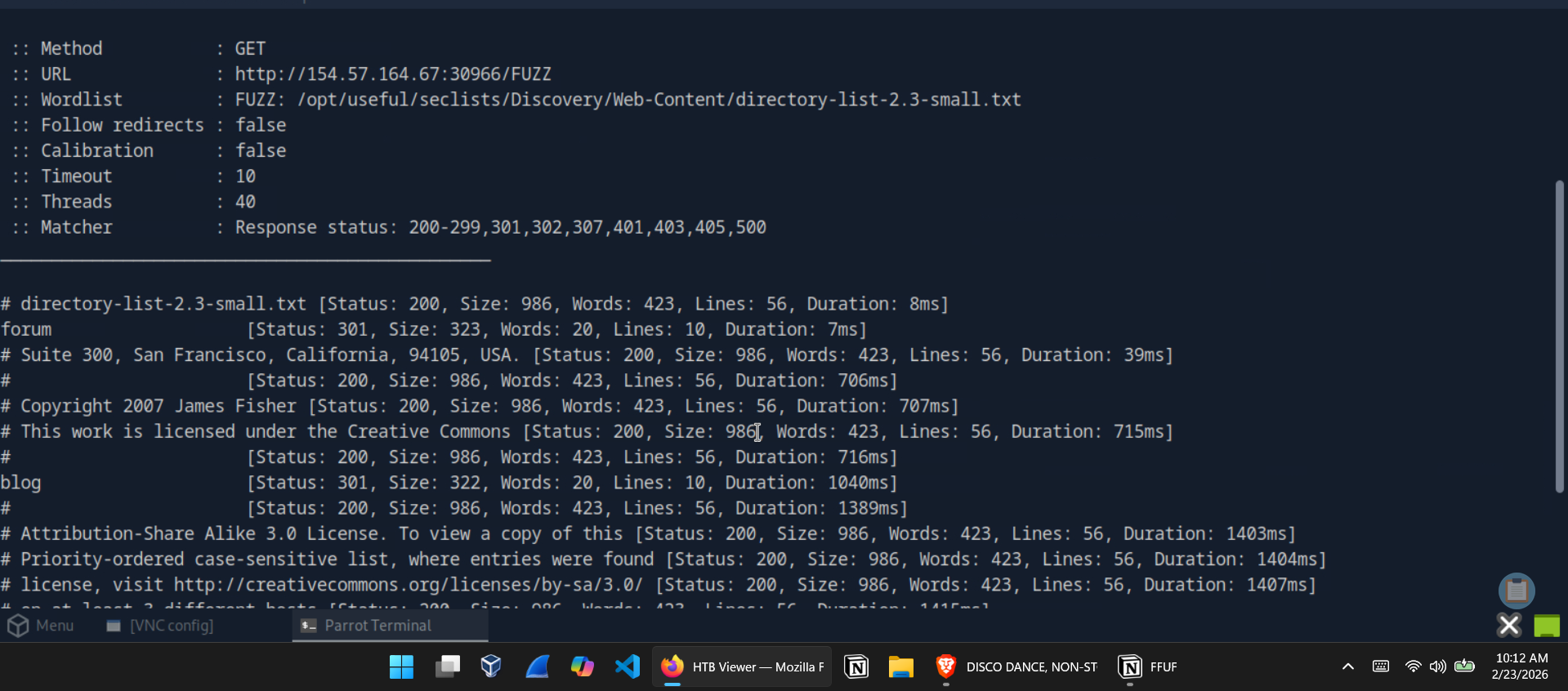 ffuf directory scan — forum and blog identified via 301 redirects
Page Fuzzing — Finding the Flag in /blog
💡 Question: Try to use what you learned in this section to fuzz the
/blogdirectory and find all pages. One of them should contain a flag. What is the flag? Answer:HTB{bru73_f0r_c0mm0n_p455w0rd5}
Page fuzzing is a two-step process: first identify what extensions the server accepts, then fuzz for pages using that extension.
Step 1 — Extension fuzzing:
1
2
ffuf -w /opt/useful/seclists/Discovery/Web-Content/web-extensions.txt:FUZZ \
     -u http://154.57.164.67:30966/blog/indexFUZZ
This returned a 200 OK on .php — confirming PHP as the active server-side language.
Step 2 — Page fuzzing with the .php extension:
1
2
ffuf -w /opt/useful/seclists/Discovery/Web-Content/directory-list-2.3-small.txt:FUZZ \
     -u http://154.57.164.67:30966/blog/FUZZ.php
1
home         [Status: 200, Size: 1046, Words: 438, Lines: 58, Duration: 2112ms]
Navigating to /blog/home.php revealed the flag.
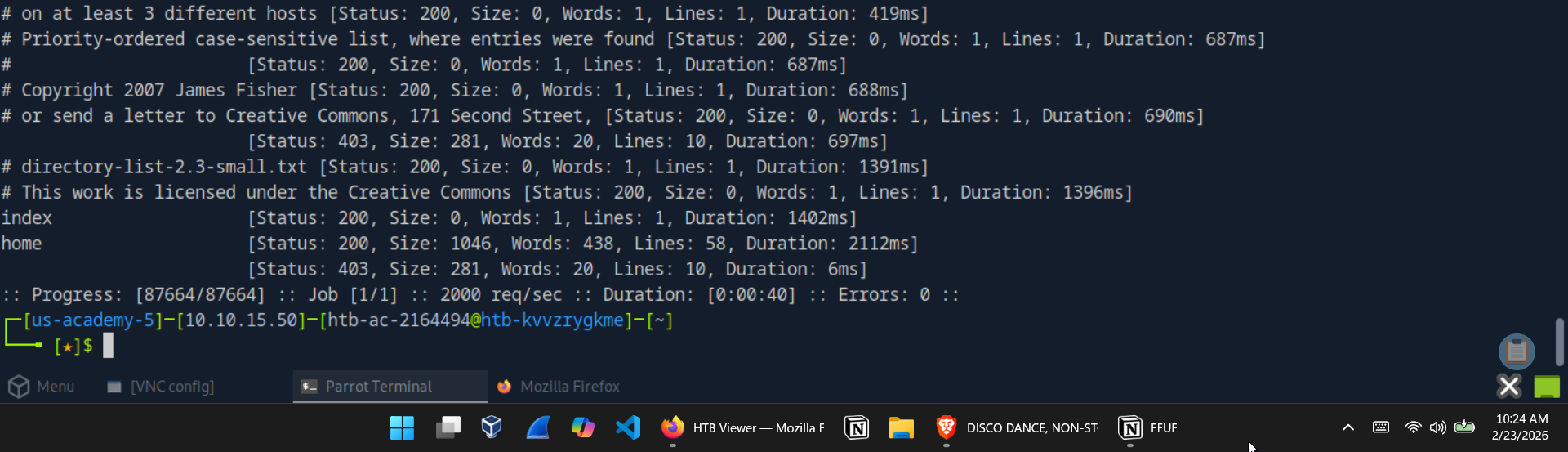 Page fuzzing output — home.php identified with a distinct response size
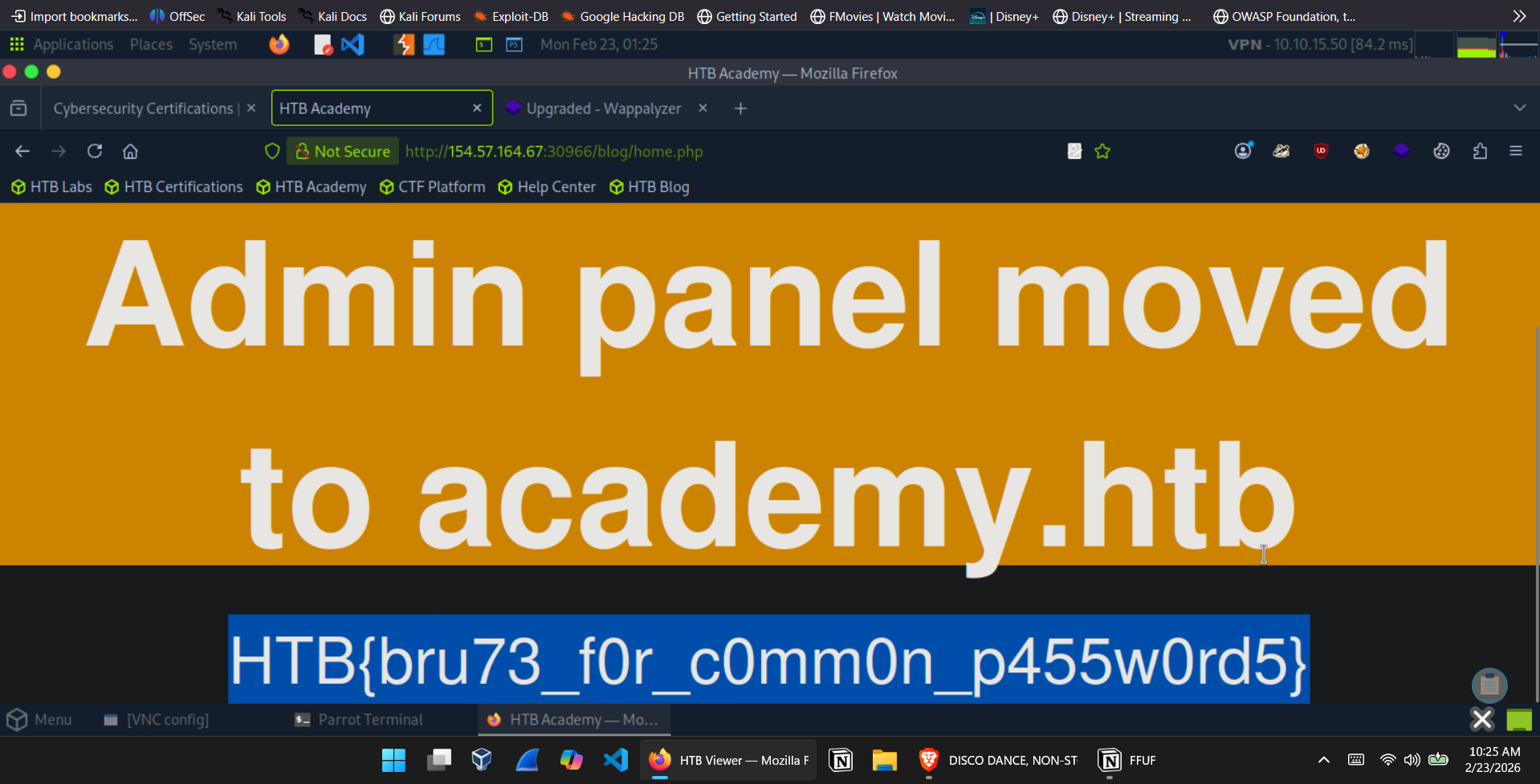 /blog/home.php — Admin panel moved notice and flag exposed
Recursive Fuzzing — Capturing a Deeper Flag
💡 Question: Try to repeat what you learned so far to find more files/directories. One of them should give you a flag. What is the content of the flag? Answer:
HTB{fuzz1n6_7h3_w3b!}
Recursive fuzzing allows ffuf to automatically descend into discovered directories rather than requiring separate scans per path. The -recursion flag enables it, while -recursion-depth 1 limits the scan to the top-level directories and their immediate sub-directories — enough depth without generating unnecessary noise.
1
2
3
ffuf -w /opt/useful/seclists/Discovery/Web-Content/directory-list-2.3-small.txt:FUZZ \
     -u http://154.57.164.79:31086/FUZZ \
     -recursion -recursion-depth 1 -e .php -v
The -e .php flag appends the extension to each candidate, and -v outputs the full URL path for each match. The scan surfaced /forum/flag.php, which returned the flag directly on visit.
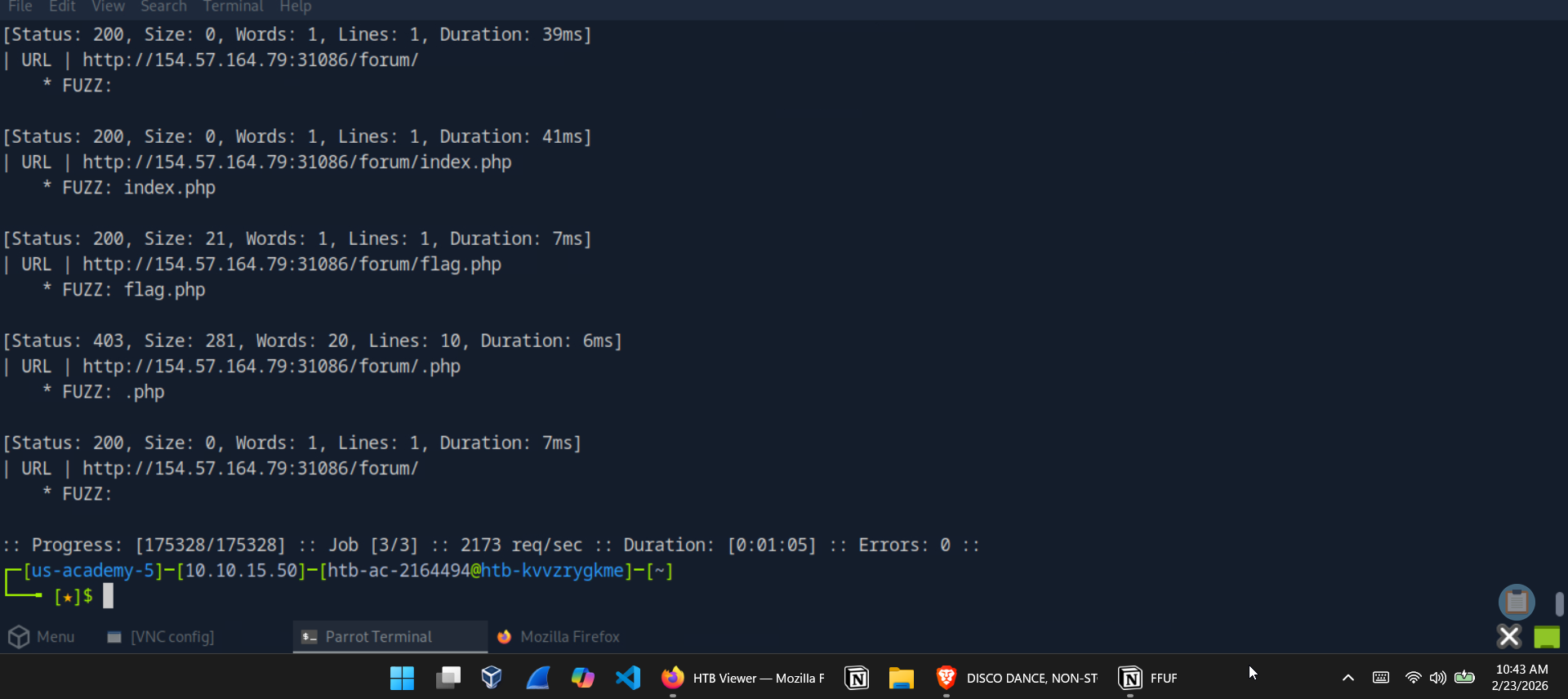 Recursive scan revealing /forum/flag.php
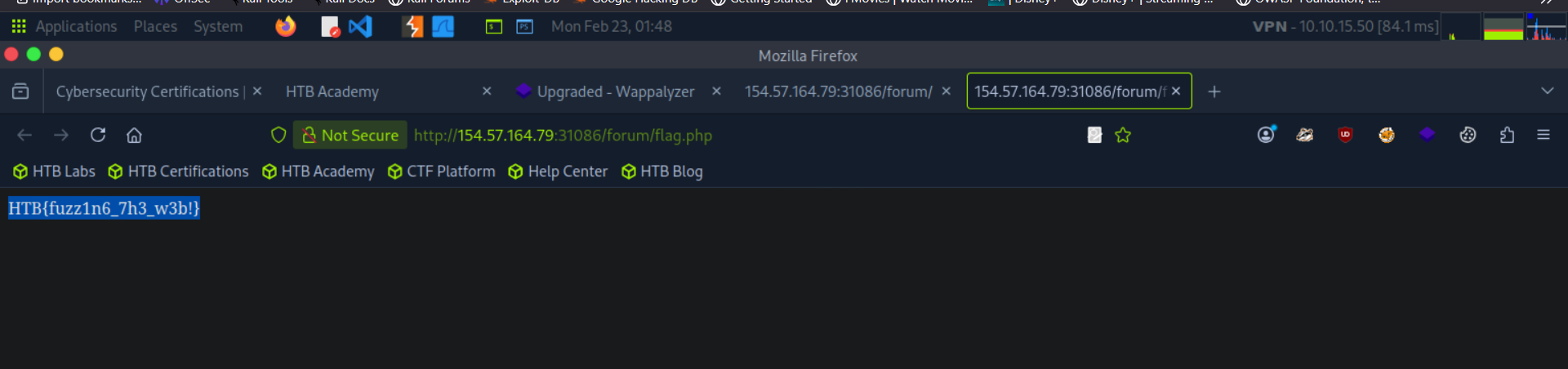 /forum/flag.php — flag retrieved
Part 2: Subdomain and VHost Enumeration
Subdomain Fuzzing on inlanefreight.com
💡 Question: Try running a sub-domain fuzzing test on
inlanefreight.comto find a customer sub-domain portal. What is the full domain of it? Answer:customer.inlanefreight.com
Subdomain fuzzing works by substituting the FUZZ placeholder at the subdomain position of the URL:
1
2
ffuf -w /opt/useful/seclists/Discovery/DNS/subdomains-top1million-5000.txt:FUZZ \
     -u https://FUZZ.inlanefreight.com/
1
customer     [Status: 301, Size: 0, Words: 1, Lines: 1, Duration: 51ms]
The customer subdomain resolved cleanly, giving the full domain customer.inlanefreight.com.
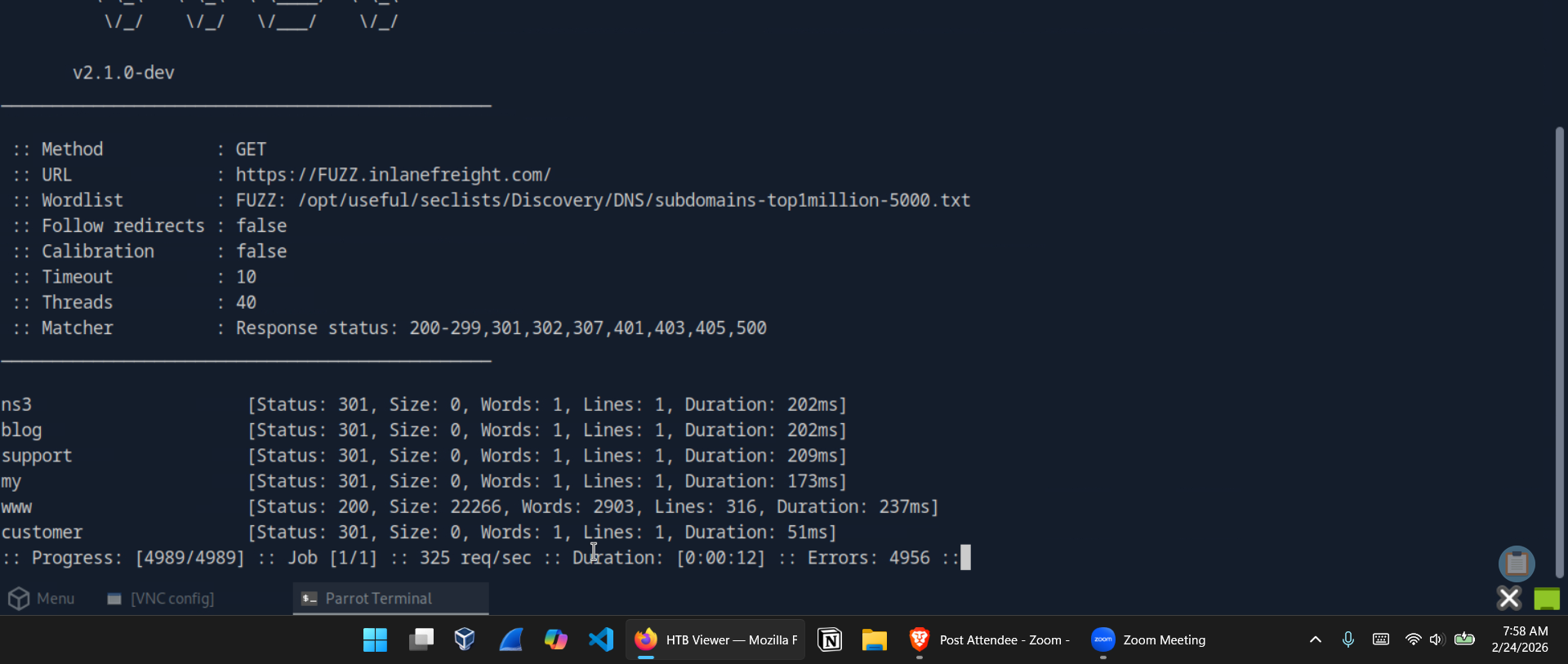 Subdomain fuzzing on inlanefreight.com — customer subdomain identified
VHost Fuzzing on academy.htb
💡 Question: Try running a VHost fuzzing scan on
academy.htb. What other VHosts did you get? Answer:test.academy.htb
VHost fuzzing differs from subdomain fuzzing in an important way: rather than targeting DNS, it manipulates the HTTP Host header directly. This is how internally routed virtual hosts — which may never appear in DNS — can be enumerated.
The -ms 0 flag filters for responses with a size of zero bytes, which is the response size for valid VHosts on this target (invalid ones return the default page):
1
2
3
4
ffuf -w /opt/useful/seclists/Discovery/DNS/subdomains-top1million-5000.txt:FUZZ \
     -u http://academy.htb:30646/ \
     -H 'Host: FUZZ.academy.htb' \
     -ms 0
1
2
test         [Status: 200, Size: 0, Words: 1, Lines: 1, Duration: 731ms]
admin        [Status: 200, Size: 0, Words: 1, Lines: 1, Duration: 746ms]
Both test.academy.htb and admin.academy.htb were identified.
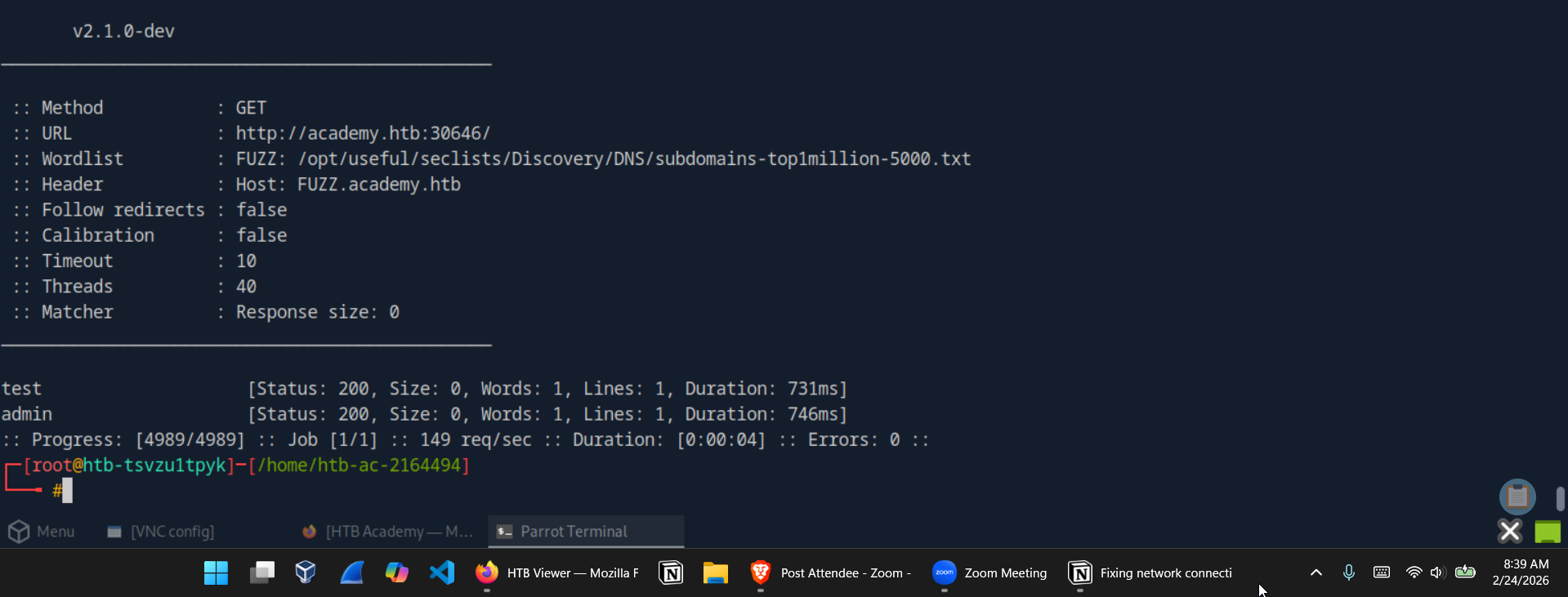 VHost fuzzing on academy.htb — test and admin VHosts discovered
Part 3: Parameter Fuzzing
GET Parameter Discovery
💡 Question: Using what you learned in this section, run a parameter fuzzing scan on this page. What is the parameter accepted by this webpage? Answer:
user
With admin.academy.htb identified, the next step was discovering what GET parameters the admin panel accepts. The -fs 798 flag filters out responses matching the default 798-byte error response, leaving only genuine parameter hits:
1
2
3
ffuf -w /opt/useful/seclists/Discovery/Web-Content/burp-parameter-names.txt:FUZZ \
     -u http://admin.academy.htb:30646/admin/admin.php?FUZZ=key \
     -fs 798
1
user         [Status: 200, Size: 783, Words: 221, Lines: 54, Duration: 6ms]
The user parameter returned a distinct response size of 783 bytes — confirming it as a valid GET parameter.
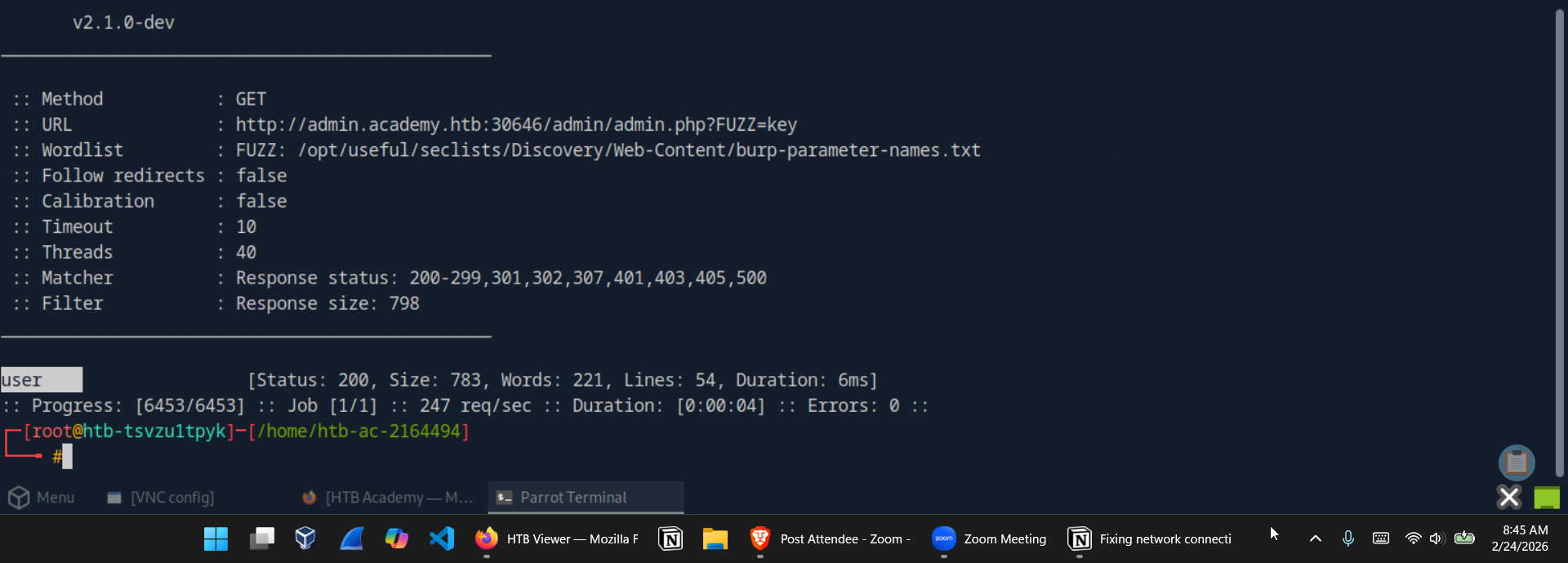 GET parameter fuzzing — user identified as accepted parameter
POST Parameter Fuzzing and Value Enumeration
💡 Question: Try to create the
ids.txtwordlist, identify the accepted value with a fuzzing scan, and then use it in a POST request withcurlto collect the flag. What is the content of the flag? Answer:HTB{p4r4m373r_fuzz1n6_15_k3y!}
This challenge required generating a custom numeric wordlist, fuzzing POST parameters for a valid ID, then retrieving the flag via curl.
Step 1 — Generate the wordlist:
1
for i in $(seq 1 1000); do echo $i >> ids.txt; done
Step 2 — Fuzz the POST id parameter:
The -X POST flag sends a POST request, -d sets the body data, and -H sets the content type. The -fs 728 flag filters the noise of invalid responses:
1
2
3
4
5
6
ffuf -w ids.txt:FUZZ \
     -u http://admin.academy.htb:30646/admin/admin.php \
     -X POST \
     -d 'id=FUZZ' \
     -H 'Content-Type: application/x-www-form-urlencoded' \
     -fs 728
1
73           [Status: 200, Size: 787, Words: 218, Lines: 54, Duration: 7ms]
ID 73 returned a unique response size.
Step 3 — Retrieve the flag with curl:
1
curl http://admin.academy.htb:30646/admin/admin.php -X POST -d 'id=73'
The response body contained the flag inline.
Value fuzzing — id=73 identified as valid
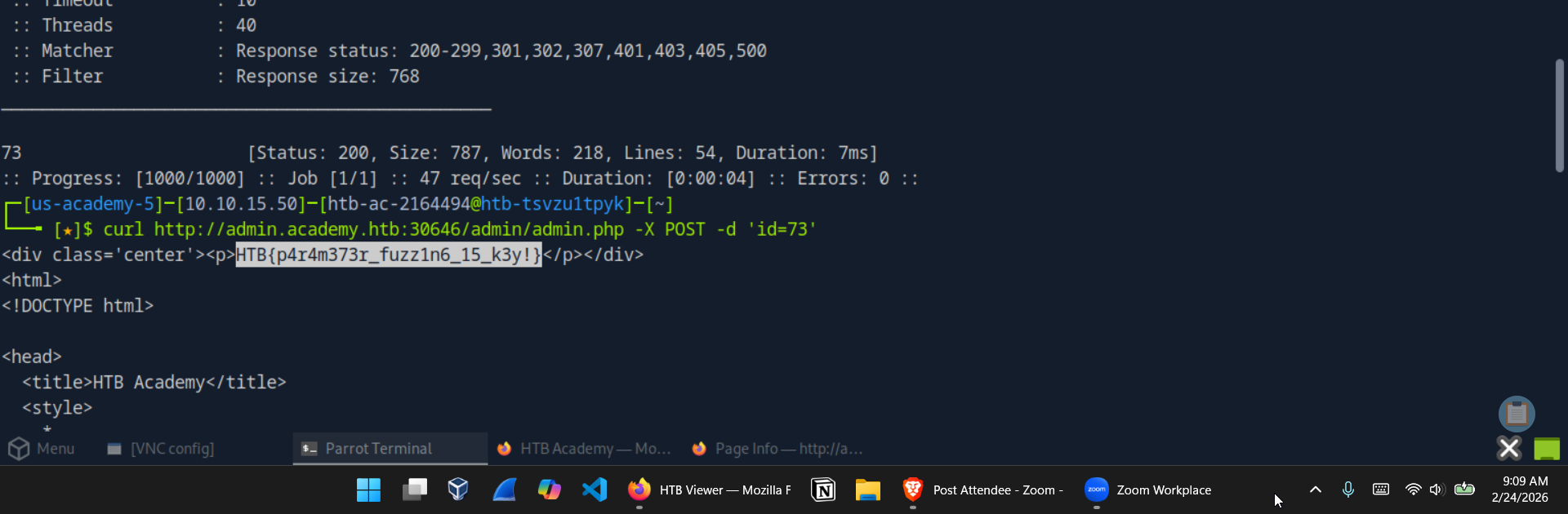 curl POST request returns the flag
Part 4: Skills Assessment — Web Fuzzing
The skills assessment applied every technique covered in the module against a combined target environment on academy.htb.
Sub-domain / VHost Enumeration
💡 Question: What are all the sub-domains you can identify? Answer:
archive,test,faculty
Using the same VHost fuzzing approach from earlier, this time targeting a larger wordlist and filtering responses at size 985:
1
2
3
4
5
ffuf -w /usr/share/wordlists/seclists/Discovery/DNS/subdomains-top1million-20000.txt:FUZZ \
     -u http://academy.htb:31130/ \
     -H 'Host: FUZZ.academy.htb' \
     -fs 985 \
     > vhost-scan-output
1
2
3
archive      [Status: 200, Size: 0, Words: 1, Lines: 1, Duration: 7ms]
test         [Status: 200, Size: 0, Words: 1, Lines: 1, Duration: 729ms]
faculty      [Status: 200, Size: 0, Words: 1, Lines: 1, Duration: 7ms]
Three VHosts confirmed: archive.academy.htb, test.academy.htb, and faculty.academy.htb.
 Skills assessment VHost scan command
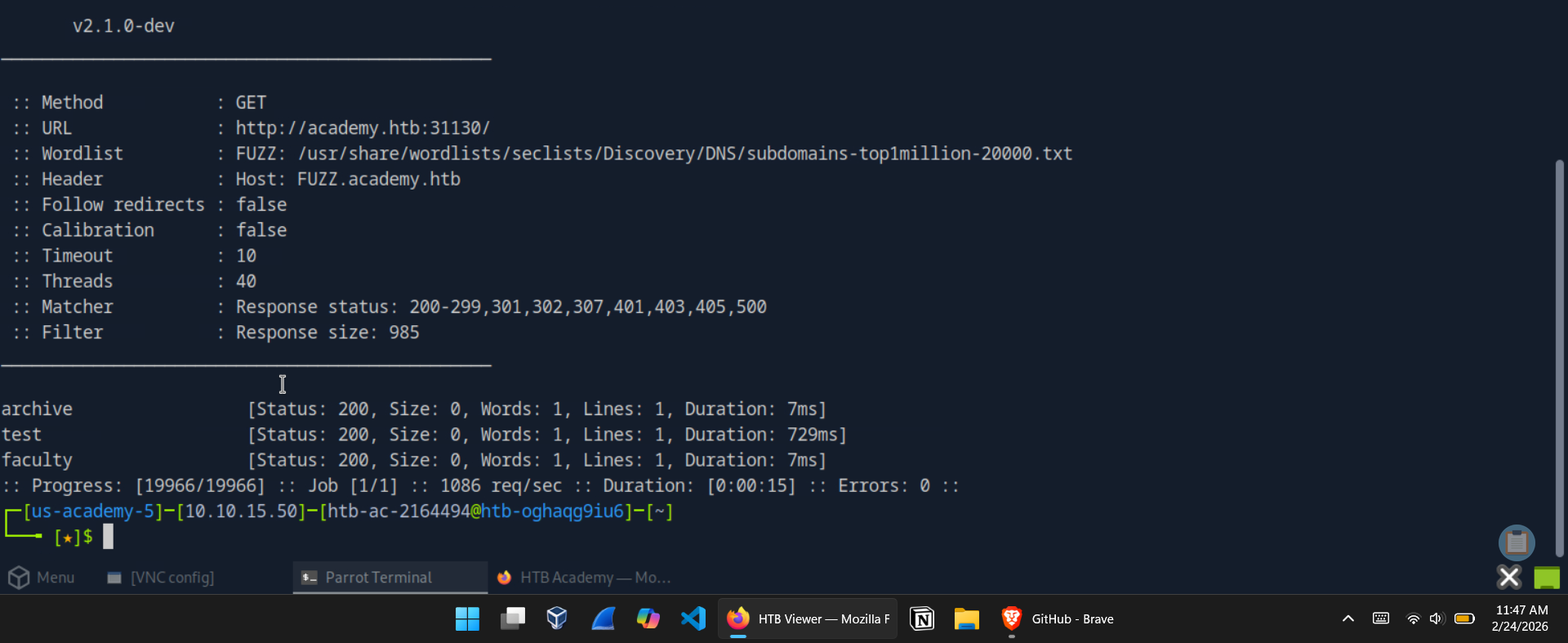 Skills assessment VHost results — archive, test, and faculty identified
Extension Fuzzing Across Sub-domains
💡 Question: What are the different extensions accepted by the domains? Answer:
.php,.php7,.phps
All three sub-domains were added to /etc/hosts first, then extension fuzzing was run against each:
1
2
3
4
5
6
7
# archive.academy.htb
ffuf -w /usr/share/wordlists/seclists/Discovery/Web-Content/web-extensions.txt:FUZZ \
     -u http://archive.academy.htb:31130/indexFUZZ

# faculty.academy.htb
ffuf -w /usr/share/wordlists/seclists/Discovery/Web-Content/web-extensions.txt:FUZZ \
     -u http://faculty.academy.htb:31130/indexFUZZ
Results confirmed .php7 and .phps alongside the standard .php — important detail for the recursive page scan to follow.
 Extension fuzzing on archive.academy.htb — php7, phps, php accepted
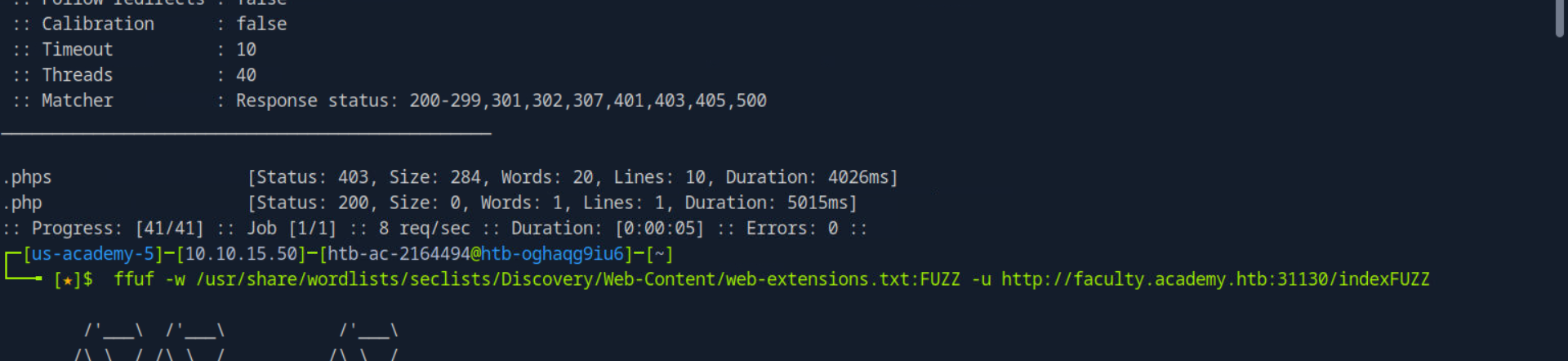 Extension fuzzing on faculty.academy.htb — phps and php accepted
Recursive Page Scan and Restricted Page Discovery
💡 Question: One of the pages you will identify should say ‘You don’t have access!’. What is the full page URL? Answer:
http://faculty.academy.htb:PORT/courses/linux-security.php7
A recursive scan with all three discovered extensions was run across each sub-domain. On faculty.academy.htb, the scan surfaced /courses/linux-security.php7 — and visiting it confirmed the restricted access message.
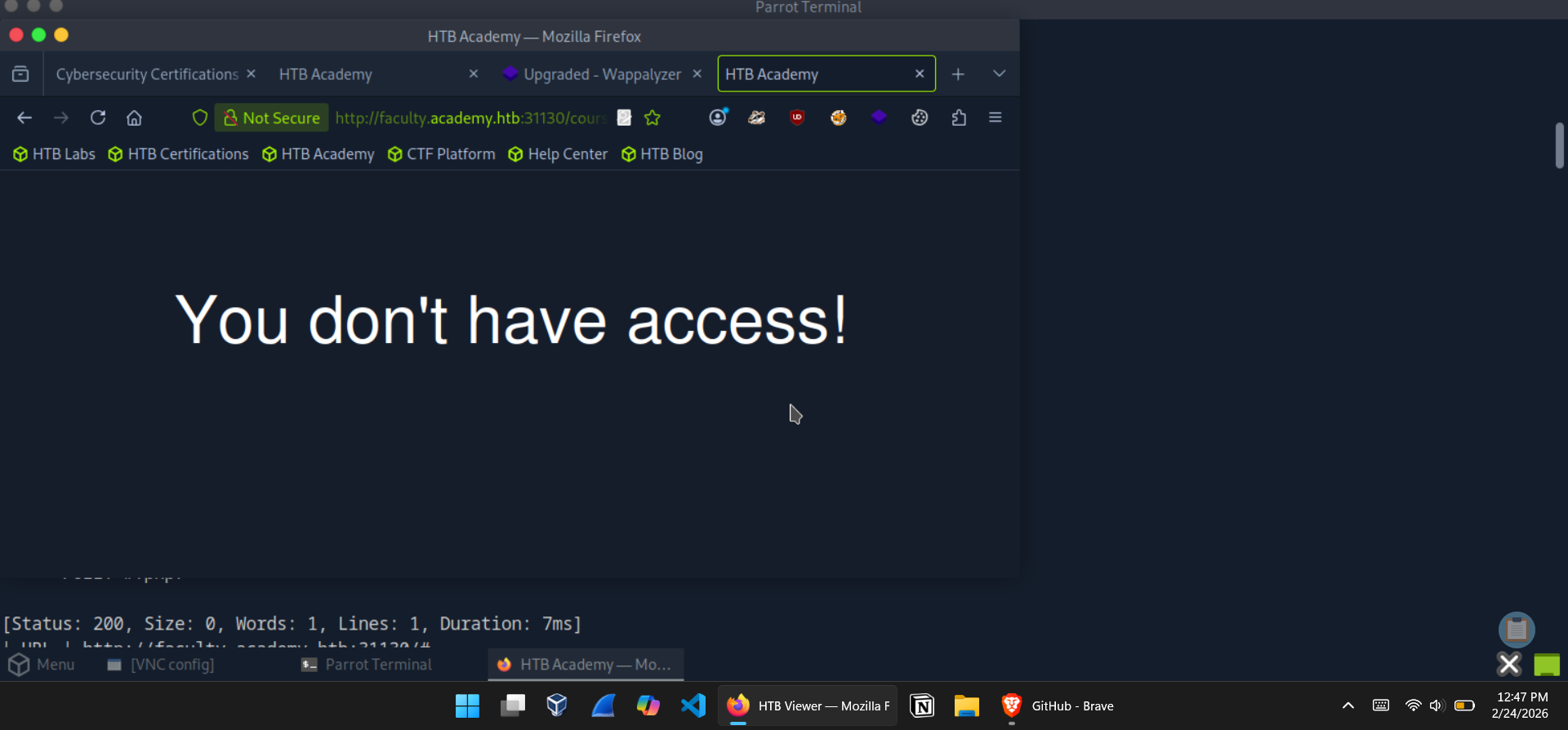 faculty.academy.htb/courses/linux-security.php7 — You don’t have access!
Parameter Discovery — GET and POST
💡 Question: What parameters are accepted by the page? Answer:
user,username
Starting with GET parameter fuzzing, the default response size on this page was 774 bytes. Filtering that out immediately reduced the noise:
1
2
3
4
ffuf -w /usr/share/wordlists/seclists/Discovery/Web-Content/burp-parameter-names.txt:FUZZ \
     -u http://faculty.academy.htb:32311/courses/linux-security.php7?FUZZ=key \
     -fs 774 \
     > param-fuzz-get
user appeared as a valid GET parameter. Moving to POST:
1
2
3
4
5
6
7
ffuf -w /usr/share/wordlists/seclists/Discovery/Web-Content/burp-parameter-names.txt:FUZZ \
     -u http://faculty.academy.htb:32311/courses/linux-security.php7 \
     -X POST \
     -d 'FUZZ=key' \
     -H 'Content-Type: application/x-www-form-urlencoded' \
     -fs 774 \
     > param-fuzz-post
Reading the output file confirmed username as a valid POST parameter.
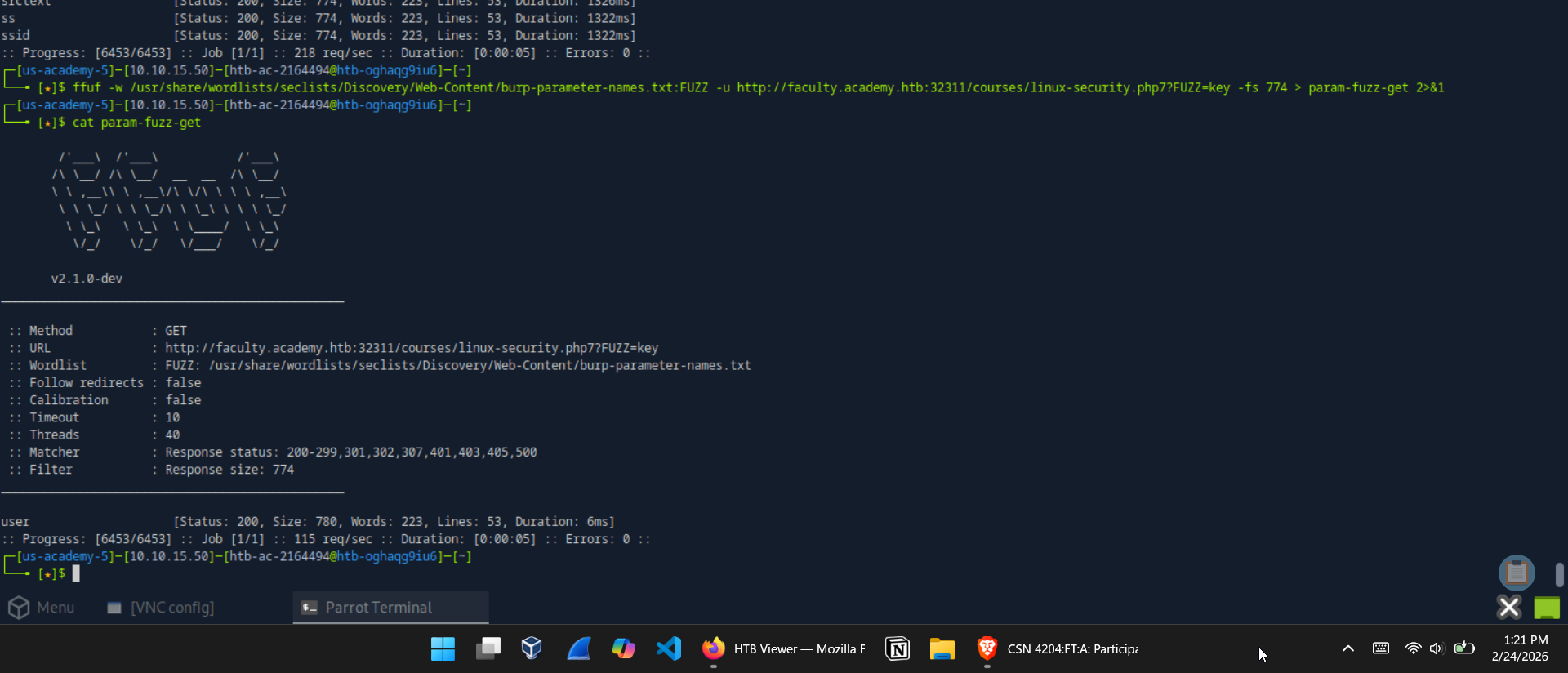 GET parameter scan — user identified
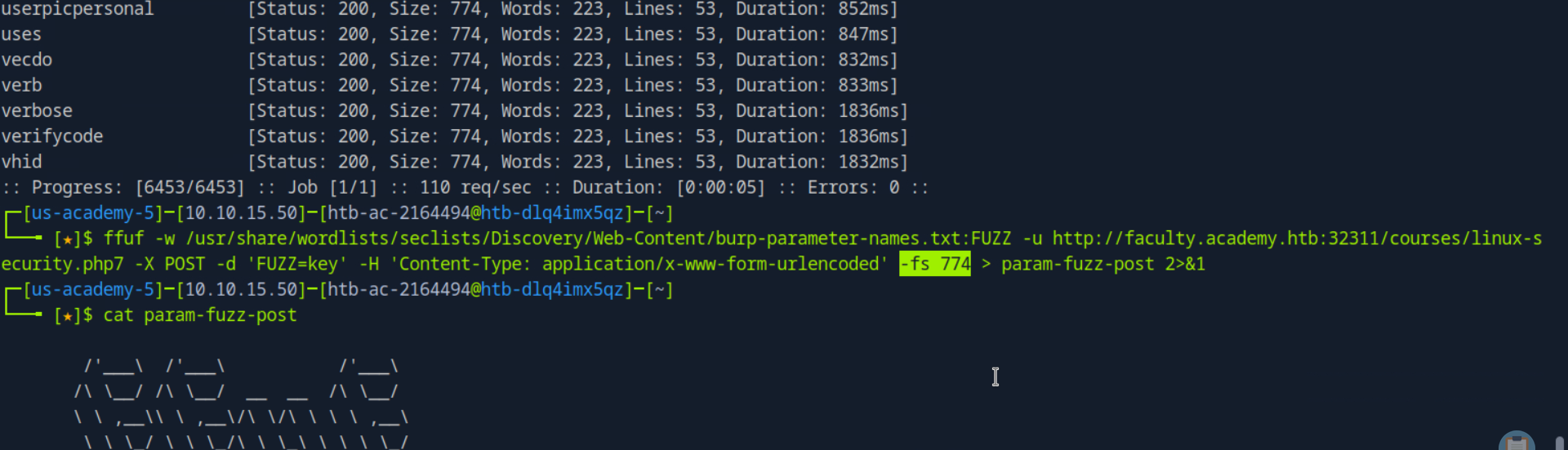 POST parameter scan — username identified
Final Flag — Value Fuzzing as Harry
💡 Question: Try fuzzing the parameters you identified for working values. One of them should return a flag. What is the content of the flag? Answer:
HTB{w3b_fuzz1n6_m4573r}
A first pass at value fuzzing against the username parameter showed invalid responses at 781 bytes. Filtering that and running against SecLists/Usernames/Names/names.txt:
1
2
3
4
5
6
7
ffuf -w /usr/share/wordlists/seclists/Usernames/Names/names.txt:FUZZ \
     -u http://faculty.academy.htb:32311/courses/linux-security.php7 \
     -X POST \
     -d 'username=FUZZ' \
     -H 'Content-Type: application/x-www-form-urlencoded' \
     -fs 781 \
     > value-fuzz
1
harry        [Status: 200, Size: 773, Words: 218, Lines: 53, Duration: 6ms]
harry returned a distinct response. Sending the confirmed value via curl to retrieve the flag:
1
2
curl -X POST -d 'username=harry' \
     http://faculty.academy.htb:32311/courses/linux-security.php7
Flag confirmed in the response body.
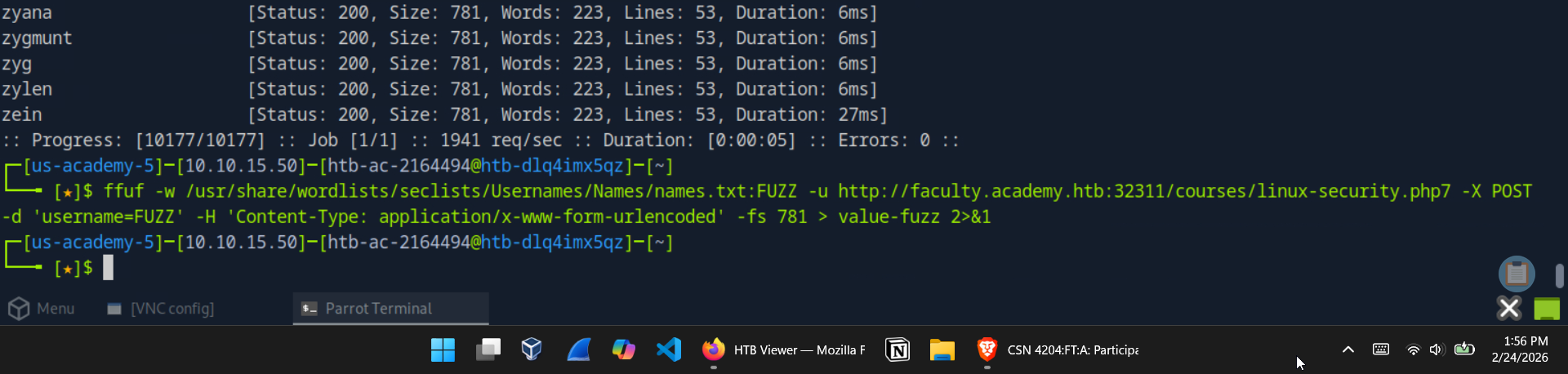 Value fuzzing command — username=FUZZ against names.txt
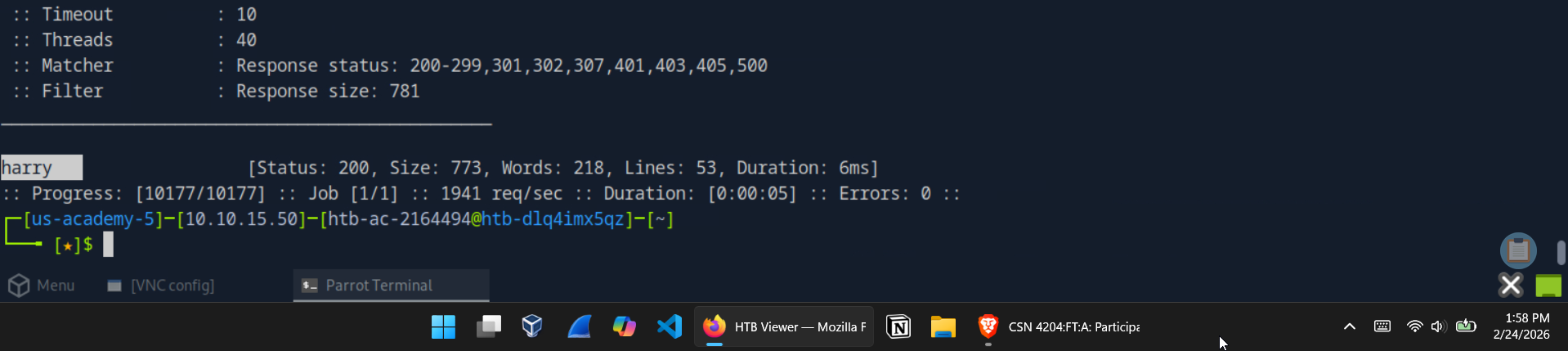 Value fuzzing result — username=harry returns a unique response
 curl POST with username=harry — final flag retrieved
Summary & Key Takeaways
This module delivered a comprehensive, hands-on introduction to web fuzzing as a recon discipline. The progression from basic directory brute-forcing through to chained parameter and value discovery mirrors exactly how a real engagement unfolds — each stage building on the last.
The ffuf command summary for this module:
| Technique | Key Flags | Purpose |
|---|---|---|
| Directory fuzzing | -w, -u | Discover hidden paths |
| Extension fuzzing | -e | Identify accepted file types |
| Recursive scanning | -recursion, -recursion-depth | Descend into discovered directories |
| Subdomain fuzzing | FUZZ.domain.com | Enumerate DNS subdomains |
| VHost fuzzing | -H 'Host: FUZZ.domain', -ms | Enumerate internally routed virtual hosts |
| GET parameter fuzzing | ?FUZZ=key, -fs | Identify accepted URL parameters |
| POST parameter fuzzing | -X POST, -d 'FUZZ=key' | Identify accepted body parameters |
| Value fuzzing | -d 'param=FUZZ', -fs | Enumerate valid parameter values |
Security Lessons
- Hidden does not mean secure. Directories and pages absent from a site’s navigation are trivially discoverable through fuzzing. Proper access controls — not obscurity — are the only reliable protection.
- Response filtering is the skill. Raw
ffufoutput is noise. Learning to identify and filter baseline response sizes cleanly is what separates useful results from overwhelming false positives. - VHost enumeration exposes internal attack surface. Hosts that never appear in public DNS are still reachable if an attacker can manipulate the
Hostheader. Internal admin panels and staging environments are common victims. - Exposed parameters are an entry point. Undocumented GET and POST parameters are frequently the gateway to logic bypasses, injection attacks, and unauthorized data access. Fuzzing finds them before an attacker does.
- Value fuzzing closes the loop. Identifying a parameter is step one. Fuzzing its accepted values — usernames, IDs, tokens — is where the real findings emerge.
Tools Used
| Tool | Purpose |
|---|---|
ffuf | Web content discovery and fuzzing |
curl | Manual HTTP request crafting for flag retrieval |
| SecLists | Wordlist collection for directories, extensions, subdomains, and parameters |
ffuf Cheat Sheet
A quick reference for every command pattern used in this walkthrough.
Directory Fuzzing
1
2
3
4
5
6
7
8
# Basic directory brute-force
ffuf -w /path/to/wordlist.txt:FUZZ -u http://TARGET/FUZZ

# With extension filtering (e.g. .php)
ffuf -w /path/to/wordlist.txt:FUZZ -u http://TARGET/FUZZ.php

# Recursive — auto-descends into discovered directories
ffuf -w /path/to/wordlist.txt:FUZZ -u http://TARGET/FUZZ -recursion -recursion-depth 1 -e .php -v
Extension Fuzzing
1
2
3
# Identify accepted file extensions
ffuf -w /opt/useful/seclists/Discovery/Web-Content/web-extensions.txt:FUZZ \
     -u http://TARGET/blog/indexFUZZ
Subdomain Fuzzing
1
2
3
# Public DNS subdomain enumeration
ffuf -w /opt/useful/seclists/Discovery/DNS/subdomains-top1million-5000.txt:FUZZ \
     -u https://FUZZ.domain.com/
VHost Fuzzing
1
2
3
4
5
6
# Internal virtual host enumeration via Host header manipulation
# Adjust -ms (match size) or -fs (filter size) to your target's baseline response
ffuf -w /opt/useful/seclists/Discovery/DNS/subdomains-top1million-5000.txt:FUZZ \
     -u http://TARGET_IP:PORT/ \
     -H 'Host: FUZZ.domain.htb' \
     -ms 0
GET Parameter Fuzzing
1
2
3
4
5
# Discover accepted URL parameters
# Replace -fs value with your target's baseline response size
ffuf -w /opt/useful/seclists/Discovery/Web-Content/burp-parameter-names.txt:FUZZ \
     -u http://TARGET/page.php?FUZZ=key \
     -fs BASELINE_SIZE
POST Parameter Fuzzing
1
2
3
4
5
6
7
# Discover accepted POST body parameters
ffuf -w /opt/useful/seclists/Discovery/Web-Content/burp-parameter-names.txt:FUZZ \
     -u http://TARGET/page.php \
     -X POST \
     -d 'FUZZ=key' \
     -H 'Content-Type: application/x-www-form-urlencoded' \
     -fs BASELINE_SIZE
Value Fuzzing
1
2
3
4
5
6
7
8
9
10
11
12
13
14
15
16
17
18
# Generate a numeric wordlist
for i in $(seq 1 1000); do echo $i >> ids.txt; done

# Fuzz POST parameter values with custom wordlist
ffuf -w ids.txt:FUZZ \
     -u http://TARGET/page.php \
     -X POST \
     -d 'id=FUZZ' \
     -H 'Content-Type: application/x-www-form-urlencoded' \
     -fs BASELINE_SIZE

# Fuzz with a names wordlist
ffuf -w /opt/useful/seclists/Usernames/Names/names.txt:FUZZ \
     -u http://TARGET/page.php \
     -X POST \
     -d 'username=FUZZ' \
     -H 'Content-Type: application/x-www-form-urlencoded' \
     -fs BASELINE_SIZE
Retrieving Results with curl
1
2
3
4
5
6
7
8
9
10
11
# Send a confirmed GET parameter
curl "http://TARGET/page.php?user=VALUE"

# Send a confirmed POST parameter
curl -X POST -d 'id=VALUE' http://TARGET/page.php

# Send a confirmed POST parameter with explicit content type
curl http://TARGET/page.php \
     -X POST \
     -d 'username=VALUE' \
     -H 'Content-Type: application/x-www-form-urlencoded'
Adding VHosts / Subdomains to /etc/hosts
1
2
3
4
5
# Add a single entry
sudo sh -c 'echo "TARGET_IP hostname.domain.htb" >> /etc/hosts'

# Add multiple sub-domains for the same IP (one-liner)
sudo sh -c 'echo "TARGET_IP archive.domain.htb test.domain.htb faculty.domain.htb" >> /etc/hosts'
Key ffuf Flags — Quick Reference
| Flag | Description |
|---|---|
-w wordlist.txt:FUZZ | Wordlist with FUZZ keyword binding |
-u URL | Target URL (use FUZZ as the injection point) |
-e .php,.php7 | Append extensions to each wordlist entry |
-recursion | Auto-fuzz newly discovered directories |
-recursion-depth N | Limit recursion to N levels deep |
-v | Verbose — print full discovered URLs |
-H 'Header: Value' | Set a custom HTTP header |
-X POST | Use POST instead of GET |
-d 'param=FUZZ' | POST request body |
-fs N | Filter out responses of size N bytes |
-ms N | Only match responses of size N bytes |
-fc N | Filter out responses with HTTP status code N |
-mc N | Only match responses with HTTP status code N |
-o output.txt | Save results to a file |
-t N | Number of concurrent threads (default: 40) |
References
HTB Academy — Attacking Web Applications with Ffuf. https://academy.hackthebox.com/module/details/54
ffuf — Fuzz Faster U Fool. https://github.com/ffuf/ffuf
HTB Academy Achievement. https://academy.hackthebox.com/achievement/2164494/54/